Do You Follow The Ten Vibe Coding Commandments? Read More →
Features Why Arkweaver Enterprise Blog About
Login
Features Why Arkweaver Enterprise Blog About Login
← Back to blog home
Arkweaver logo

Arkweaver Blog

The Definitive Guide for Sales People to Learn Vibe Coding

By Patrick Randolph

March 20, 2026 • 119 min read

On this page

  • Goal: Sales to become PMs and devs.
  • AI 201 for Sales Reps
  • Rules guiding Us and My Promise to You
  • Conflicts/Transparency stuff
  • 3 Rules to Guide your use of AI
  • What we will cover in this program
  • Things to download
  • Lesson 1: How to use AI to make you a better sales person
  • Let’s make you a better sales person with AI (ie less wasting time on crap)
  • Project: Building Linkedin Automation that will work for sales people (and me)
  • How a Sales Person should use AI to Become Good at Other Roles
  • How a Sales Person Should Prototype
  • A Word on Level of Effort
  • Conclusion
  • Rules guiding us here
  • 3 Rules guiding your use of AI
  • Conflicts/Transparency stuff
  • Parts of this program
  • Things to download
  • Lesson 1: Using Ai to make you (a sales person) better at sales.
  • Let’s make you a better sales person (ie less wasting time on crap)
  • Project: Building linkedin automation that does work for me.
  • Sales to do other jobs
  • Conclusion
  • Rules guiding us here
  • 3 Rules guiding your use of AI
  • Conflicts/Transparency stuff
  • Parts of this program
  • Things to download
  • Lesson 1: Using Ai to make you (a sales person) better at sales.
  • Let’s make you a better sales person (ie less wasting time on crap)
  • Project: Building linkedin automation that does work for me.
  • Sales to do other jobs
  • Conclusion
  • Rules guiding us here
  • 3 Rules guiding your use of AI
  • Conflicts/Transparency stuff
  • Parts of this program
  • Things to download
  • Lesson 1: Using Ai to make you (a sales person) better at sales.
  • Let’s make you a better sales person (ie less wasting time on crap)
  • Project: Building linkedin automation that does work for me.
  • Sales to do other jobs
  • Conclusion
  • Rules guiding us here
  • 3 Rules guiding your use of AI
  • Conflicts/Transparency stuff
  • Parts of this program
  • Things to download
  • Lesson 1: Using Ai to make you (a sales person) better at sales.
  • Let’s make you a better sales person (ie less wasting time on crap)
  • Project: Building linkedin automation that does work for me.
  • Sales to do other jobs
  • Conclusion
  • Rules guiding us here
  • 3 Rules guiding your use of AI
  • Conflicts/Transparency stuff
  • Parts of this program
  • Things to download
  • Lesson 1: Using Ai to make you (a sales person) better at sales.
  • Let’s make you a better sales person (ie less wasting time on crap)
  • Project: Building linkedin automation that does work for me.
  • Sales to do other jobs
  • Conclusion
  • Rules guiding us here
  • 3 Rules guiding your use of AI
  • Conflicts/Transparency stuff
  • Parts of this program
  • Things to download
  • Lesson 1: Using Ai to make you (a sales person) better at sales.
  • Let’s make you a better sales person (ie less wasting time on crap)
  • Project: Building linkedin automation that does work for me.
  • Sales to do other jobs
  • Conclusion

Goal: Sales to become PMs and devs.

What the f—-: why? I gotta hit quota man! Have you seen the job market out here? Is this one of those fads?

No.

Here's why you should keep reading

#1: You want to make money 

The number 1 reason top reps lose deals is a lack off features. This is based on a study of $54 billion in opportunities and is (genuinely) the only good loss reason analysis I've found on the internet. You couldn’t do a damn thing about that before AI, now you can.

#2: You want to keep making money

Future proof your career. The secret with AI is that it makes you better at other jobs, not just your own. I can quote you a litany of studies, but you know this to be true.

#3: It's so much damn fun, it's literally addicting.

"The endorphin reward cycle was always there for me when I coded 10yrs ago. But this is so much more fun". I've gotten some form of this text from many buddies over the last year. Creating is fun. 

AI 201 for Sales Reps

Think of this as AI 201 for Sales Reps. I assume you are already using ChatGPT, AI in your existing products, and maybe even Claude Cowork or Codex. That's covered in the 101 course that everyone has created. This is the next level. If you get through these projects, you can do anything (except coordinate multiple ai agents working well autonomously...I haven't figured that one out yet).

Rules guiding Us and My Promise to You

  • No bullshit: I will only walk through the things I do and that work for me. Other things make work for other people, but they don’t for me.
  • Practical: theory will sometimes come in, but this will be lessons and ideas you can use right now.
  • Swearing: I will swear. If you do not like it, let me know, ill try to do it less.

Conflicts/Transparency stuff

I have no paid deals with anyone or anything. Arkweaver is my company, I will mention it. This problem and you are why im building Arkweaver.

3 Rules to Guide your use of AI

Ok, lets get into it. Here are the three rules you need to keep dear. I don't want you to have to learn them the way I did which is dozens of wasted hours and screaming at inanimate objects.

  1. Perfect is the enemy of good: you will lose 90% of your time on 10% of the task. So stop at 90%. Practically, only go three prompts deep. If AI hasn’t solved the problem, to your liking, after 3 prompts, move on. This rule will save you hours.
  2. Don’t be afraid of code: it’s just words man. You have cold called thousands of strangers, you can do this. Also, with AI, you don’t need to know what the words even mean, you just can’t be afraid of it.
  3. Come with a Problem to Solve and Definitive End: before you start, know exactly what problem you want to solve and what successful output will look like. AI will always want to push you further (it’s how it keeps you engaged) by proposing just one more thing. IGNORE IT or you will hate it.


Side Note: AI is never satiated. It’s a way to keep you addicted, don’t let it waste your time. Ask it to give you a grade on something, it will give you a B/B+. It will always find things wrong even if it eventually gives you an A/A+. Doesn’t mean something is wrong, its just the way it was setup, never to give you a simple answer so you always need it.


What we will cover in this program

Step 1: AI to make you better at your sales job

Potential Gains: eh, 10%? You are already pretty good at it, AI can only make you so much better.

Step 2: AI to make you better at other jobs…which will make you close more deals

Potential Gains: Massive: 50%

Question you may ask: We have programs that do this AI stuff, why am I building my own? AI, more than anything, is learning by doing. You cannot take a course, it will be outdated within a month. The only thing you can do is do. To quote Jimmy from The Wire, the patreon saint of sales people, "Get up and knock on some doors." Sales is all about doing. But also, its fun to create man! It will inspire you to solve problems in a different way.

Question 2 you may ask: is this just AI slop? Your GD right some of it is! My fingers hurt. I got kids and a company to run so I will use AI sometimes.


Things to download

Here are the things I use. If you want to use Claude Cowork or whatever that's fine. But do not over think this, you will get AI Fomo.

  1. Cursor: this is how you write and more important, view code.
  2. Add Claude or Codex in the right side (guides are hyperlinked).

(call out): yo, my computer is slow! These things take up a lot of memory, when we run stuff, ill show you how to make it not slow.


Lesson 1: How to use AI to make you a better sales person

I want to start you with something to get you over your fear.

Instructions
Screenshot 2026-03-19 at 3.53.40 PM.png
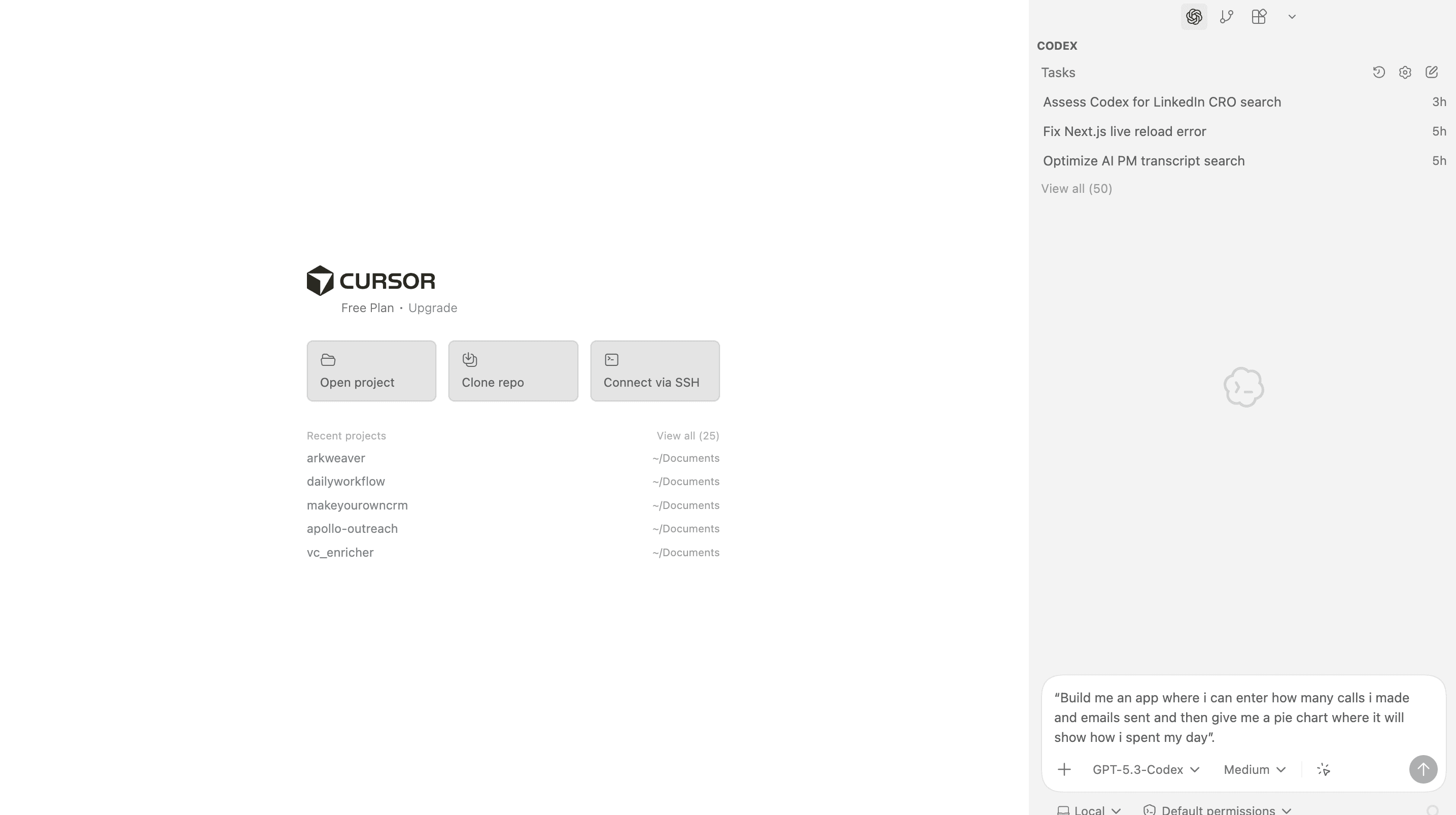
  1. Open Cursor. 

  2. Go to Codex/Claude on the right side. 

  3. Tell it to build you an app. Specifically, lets go with:

“Build me an app where i can enter how many calls i made and emails sent and then give me a pie chart where it will show how i spent my day”. 

 4. Once done, ask Codex how to run it.

 5. In Cursor, click Terminal in the top toolbar. The terminal is where you tell your computer to do things in computer speak. Its a bit painful to work with. In that terminal enter what codex said.

 6. Play with the app. Add a feature. “Hey, i want to have a log of each day's activities”

 7. Change the Code: Go to Cursor and look at the code. Scroll through it. Get over your fear. Change one word, that appears in the app, in the code (Cmd+shift+F) and then enter a word you want to change) and Save it. Then look at your app…its changed. F—--- magic right (yea, apparently using the f word is bad)

 8. Push up to Github: Up till now you were running locally, I hope you are shaking in your boots. It ain’t that bad, you’ve just built it up in your head.

Side Note: “Running locally” - wtf does that mean? This is a term you've heard before and will hear a lot more with AI. Locally means you are running it on your computer. You are not using the internet, connecting to the cloud. It means the data isn’t leaving your computer. It means you don’t need internet. It also means your computer will be slow.

How to Push Code up to Github

Type to Codex/Claude: "how do i add this to github? assume im a complete novice.

If it gives you a wall of text, don't be intimidated. That's what happened to me, so I replied,

“Whoa way too hard, can you do it for me”.

It will walk you through some steps. You will have to create a Github account. Do it!!! Conquer your fear, it means more money!

A word on Prompting: everyone says the prompt is so important. If you only get one shot it is, but you get multiple shots, so don’t worry about it. If you are freaking out about that, ask gemini/chatgpt/claude whatever to make a good, short prompt. I often will have ChatGPT make a prompt for Codex, even though its the same product. They tend to be a bit overkill so I don't always use them. In fact, I probably wouldn't for these use cases.

How to let other people use your app - Vercel

The advanced class tip here. No one else can use this app but you. You can send it to your spouse/partner/hookup/parent and they can not because they aren't on your computer. But…lets say you want to. Doing the following will give you Creator potential, which seems like a thing to have. 

Sign-up for Vercel (it’s free). Connect the Github you created. It will then create a link for your app. somethingsomething.vercel.com. Then you can share that with someone and they can see your work. They can use it. If you get stuck, just ask AI how to solve it (remember our rule of 3, only 3 prompts deep). This is master level because if you can make something that other people can use, the only ceiling is your imagination (and money and databases but those are solvable problems with the improvement to your take home pay after this course).

Now that you’ve built an app and faced your fear of code, you are ahead of 99% of people (seriously, i asked everyone on the planet if they were scared of code, you can trust it).


Let’s make you a better sales person with AI (ie less wasting time on crap)

There are a ton of LinkedIn posts with best practices for this and I've tried damn near all of them. Here’s my experience. Not to call out these companies because other people get a lot of use out of them. Could be the user (ie me) who messed up.

  • Clay: very high learning curve that I spent multiple days on to learn only to find out that mass cold emails don’t get replies.
  • N8N: Automation platform for connecting agents. Same as Clay, don’t waste your time you aren’t a developer yet.
  • Dripify: linkedin and email automation. I found the product good but got nothing from the outcome except a really messy linkedin that i needed to clean up.
  • Call Recording (Lightfield/Gong): I love these. If they are any good, they are the best use of AI.

How Best to use AI for Sales Emails

What works (for me)

  • Follow-up post meeting from a transcript: Give it a transcript, “Write a follow-up email to them, short and sweet”
  • Prep for second meeting with person: “What did I talk about last time with this person?”
  • Trying “some ideas out” cold emails: I’ve connected Apollo to Trykitt to my Cursor and Gmail. I ask it for 20 people with XYZ title in companies with greater than 500 people. Then I give it a cold email subject line and text and it will find people and send them emails. But, no replies! This is the advanced course.
  • Email finding and enrichment “waterfall”: This is Clay’s bread and butter. I wouldn’t worry about this yourself.


What doesn’t work

  • 90+% of Cold Email Personalization: I find that AI writes too generically no matter how I prompt it.
  • The 10% that does: If you have a personal connection with a lead, AI and cold email can help. For example, they went to the same small school (shoutout Hamilton college). I created a rules document to make this happen. You can do the same. Tell your “coding assistant” “Here are 5 things (college, past employer, small town I grew up in), that if a lead has in common with me, let me know and include it in the subject line with this subject” Always refer to this when looking for people.

AI uses for Customer Research

What works for me

  • Macro and complex research of a company: Example, "tell me the latest earnings for a company and the main problems mentioned in earnings calls".


What doesn’t work for me

  • Personalized research on a person: I find its too rough around the edges. I’m looking for a needle in a haystack and if thats there great, otherwise this is nothing. Use the "Rules" document with the key commonalities above I mentioned.

AI uses for LinkedIn Outreach

What works for me

  • Linkedin posts from transcripts: they perform better! I give it transcripts and then it gives me posts. I usually edit the shit out of them though because I don't love how AI they sound.


What doesn’t work for me

  • Linkedin Automation: I mentioned this above with dripify but autocommenting on posts and auto following just hasnt worked for me, plus im not willing to give up my voice in autocommenting.

Note: I have never found full email, Linkedin, sms message automation to work for sales outreach. That just may be my bias, but I've wasted dozens of hours trying to crack this and nothing. I've also never had another founder tell me it worked for them.


Project: Building Linkedin Automation that will work for sales people (and me)

Goal: I like to follow-up with people on their linkedin after I’ve emailed them. It's the red billboard theory of making sure they see you many times. I don’t trust a machine to do it, I've tried.

What I use: I use the Codex app for this, you can do that, our Cursor setup, or Claude Cowork.
Screenshot 2026-03-19 at 4.20.38 PM.png

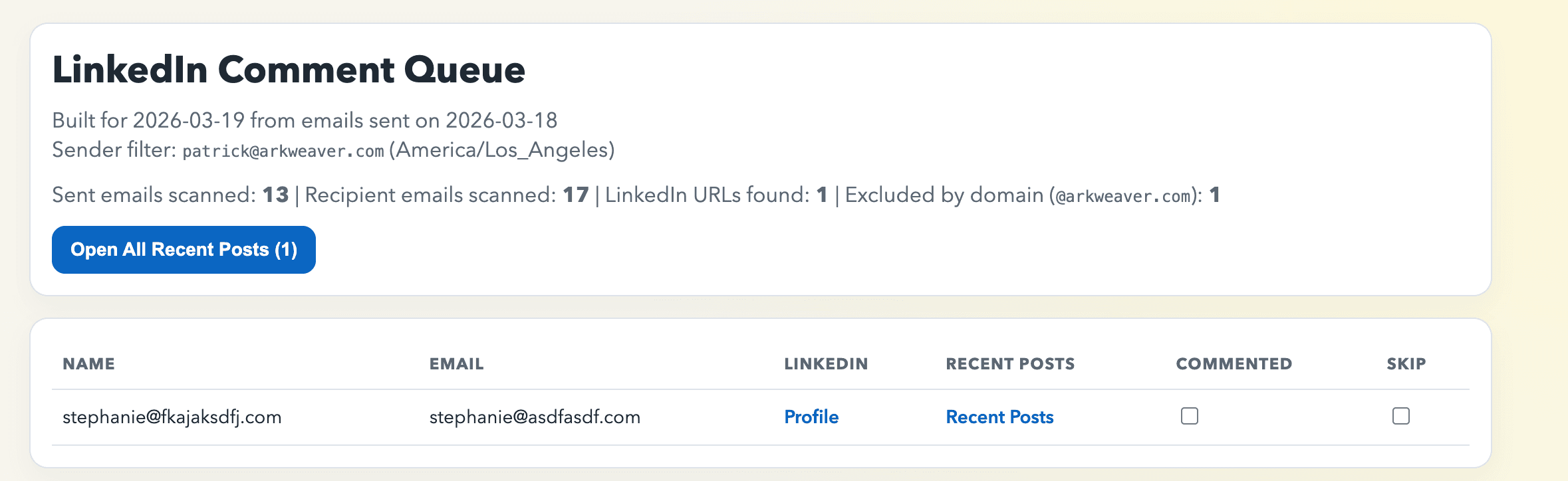
What my automation does

  1. Looks at who I emailed yesterday
  2. Looks at spreadsheet I have of all the people I'm targeting in my current campaign
  3. Spreadsheet has the email addresses, title, name, and their Linkedin Profile URLs
  4. Creates a webpage with those people, their Linkedin profiles, and Linkedin Recent Activity Link. It then has a checklist I can work.
  5. Opens it for me
  6. I go in and and comment on people's posts where relevant


This is advanced. It involves using API keys, that’s where this stuff gets intimidating. But if you stick with it, it unlocks lots of workflows. Here’s exactly (sics and all) what i did.

(Note: I choose Gmail because you can do this with your personal email.)

Spreadsheet to create before doing this

Choose the last three people you emailed and if you pasted in my prompt:

  • Email: Column F
  • Linkedinurl: Column K
  • First Name: Column B
  • Last Name: Column C

How I Prompted to Create a Linkedin Automation for Follow-up Comments

Prompt 1

Task i'd like to do: the morning after i email someone from patrick@arkweaver.com, id like to comment on their linkedin posts. i want to write the comments, but the easier it is for me to see them (fewest clicks) the better. whatd you recommend?

Prompt 2

we have the linkedin urls in 2 spreadsheets in google drive, it would be a matter of searching their email address an dpulling the linkedin

Prompt 3

ok, i want you to implement this, what do you need from me?

Prompt 4

spreadsheet 1 (not real link): https://docs.google.com/spreadsheets/d/askldjflkasdjfkljasdlkf

Tab: "Final Attack List"

Email: Column F

Linkedinurl: Column K

First Name: Column B

Last Name: Column C

Spreadsheet 2 (not real link): https://docs.google.com/spreadsheets/d/lkaskldjflkasjdf

Tab: "List to work"

Email: Column G

LinkedinURL: Column I

First Name: Column D

Last Name: Column E

I recommend local HTML for fewest clicks.

Scheduled automation

Side Note: this will need to access your gmail METADATA. Initially it asked to look at all my emails. I have a personal hard line that i will not let it do that. Metadata shows who I send to, but no context in the emails.

After running it, i was informed that it needed to access google sheets and gmail. I asked it how to do this, step by step.

Side Note: setting this up SUCKS the first time you do it. Work through the pain. This is the hardest thing to do, but once you’ve done it, every other system seems easy.

How to Connect Your Gmail Metadata to your Vibe Coded App

  1. Go to Google Cloud Console and create a new project.
  2. In that project, open APIs & Services -> Library and enable: Gmail API & Google Sheets API
  3. Open APIs & Services -> OAuth consent screen: User type: External, Add app name + support email, Add your Gmail as a test user, Save
  4. In APIs & Services -> Credentials, create OAuth client ID: Application type: Desktop app, Copy Client ID and Client Secret
  5. Generate a refresh token for your personal Gmail account: Use OAuth 2.0 Playground, Click settings (gear) and enable “Use your own OAuth credentials”, Paste your client ID/secret
  6. Select scopes: https://www.googleapis.com/auth/gmail.metadata & https://www.googleapis.com/auth/spreadsheets.readonly
  7. Authorize with your Gmail, Exchange auth code for tokens, Copy the refresh_token

Add credentials to your project .env:

GOOGLE_OAUTH_CLIENT_ID="your-client-id.apps.googleusercontent.com"

GOOGLE_OAUTH_CLIENT_SECRET="your-client-secret"

  1. GOOGLE_OAUTH_REFRESH_TOKEN="your-refresh-token"

Share/access setup checks:

  • Ensure the same Gmail account can open the target Google Sheet
  • If the Sheet is owned by someone else, they must share it with your Gmail
  • Run your workflow and verify:
  • If you get insufficientPermissions, regenerate token with both scopes above
  • If you get invalid_grant, your refresh token is revoked/expired; re-authorize in OAuth Playground


Finally, once you are done with this, you can tell it run daily: if in Codex orCclaude Cowork it will appear there (that’s what i use). Otherwise, it may just appear in the folder in your computer. If you want to get fancy you can have it email you I think. Ask AI, idk.

So, you've created your first really hard thing. Pat yourself on the back, look at the sky, send a text to a friend, whatever it is you do.

Here is the skill as I created it: https://github.com/Kancityshuffle/LinkedinFollowUp


How a Sales Person should use AI to Become Good at Other Roles

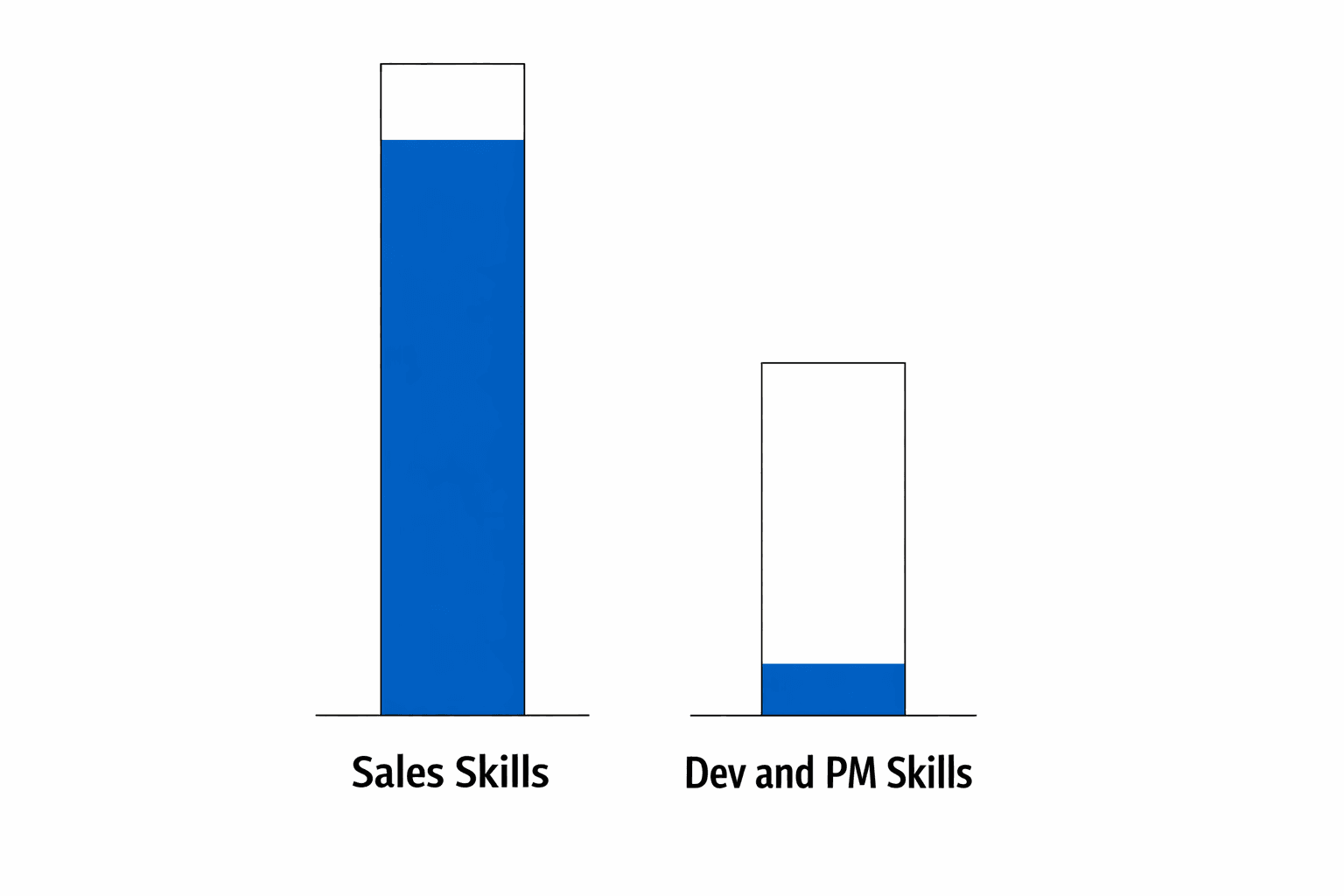
This is where the massive gains are. If you are reading this, you are probably a pretty good sales person. So anything to optimize your existing sales will have marginal impact because you are have already done a lot of it (see my beautiful graphic below for a visual representation). I will reiterate this study because its only one i’ve found with any statistical analysis: #1 reason top reps lose deals is lack of features.
ChatGPT Image Mar 20, 2026, 09_24_55 AM.png


Side Note: you can tell that its a good study because the company who made it doesn't sell sales prototyping or vibe coding software. I’d bet lots of money they were surprised by the outcome because they never mention it (since it doesn’t align with what they sell). Now me, seeing this study caused us to pivot to solving this problem because it's the biggest bang for your buck. 

But I can’t control that you whine!? …You couldn’t*. Now with AI, you can control a lot more of that problem then ever.  The goal isn't to make you a good Product Manager or Developer, it's to make you an average one. That will go incredible far and it's exactly what AI is good at. That’s why you are here.

How a Sales Person Can Become a Product Manager and Developer

The #1 reason you are losing a deal is lack of features. What does that mean in practice? How do you solve it? 

  1. You need to nail what the customer is asking for
  2. You need to convince engineers that it’s worthwhile to build now


This is what a product manager does, you can do that now.

Nailing what a customer actually wants...with code!

Step 1: To prove a point. Take a screenshot of your product we created before (or any product will do). Put it into Codex and ask it to "recreate it as an html front end with fake data".

Prompt: in a new folder, i want you to create a html copy of this product. This is only for mock-up purposes, no backend or functionality beyond clicking around is needed. Here is the image of the product i want you to copy.

Now, once it is done, ask it how to run it. View the app in your browser.

Side Note: if it asks you to run in your terminal and you are overwhelmed. On a mac do this Cmd+Space bar and type in terminal. Then ask it to tell you how to run it from your terminal.

Here’s an example I made from Slack since all you hear about is people vibe coding replacements.

What I gave it
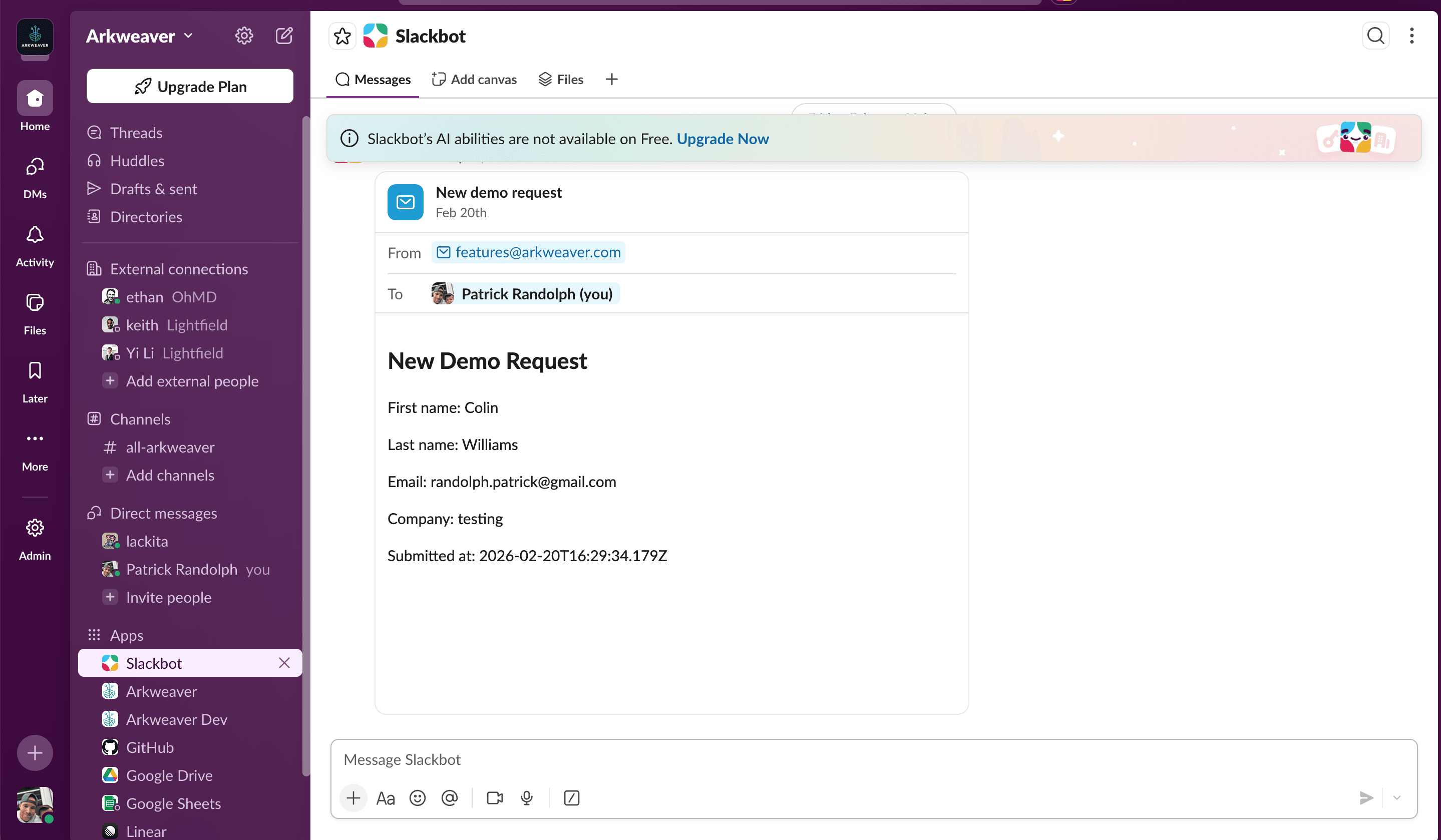
Screenshot 2026-03-12 at 9.08.27 AM.png

What AI came back with


Screenshot 2026-03-20 at 9.44.07 AM.png

I did this multiple times. The first time it looked ok. The second time, well you see the picture above. 

Look back at your product. Then look back at what you made. It's an approximation, its actually probably close. Notice the small differences between them. The icons are probably a little different or missing. The order isn’t 100% correct.

If you send to this prototype (or a better version of this) an engineer saying that the customer wants something in this screenshot, its certainly better than nothing but its AI visual slop. The engineer has gotta know exactly which parts you meant to change, which were AI mess ups, and which AI changed with you (this will happen a LOT more frequently than you think and you, non-coder, will have no idea). So then you gotta write up your changes. Are you a good writer? You are not. I am not either. Also, if you showed this to a customer, they’d ask when this could be done by. You’d answer…? Let’s pack up and go home….

How a Sales Person Should Prototype

Actually, this is why Arkweaver exists. I would call this a shameless plug but its inverse correlation (and I’ve abandoned all shame long ago, what sales person hasn’t by their tenth cold call). We did this because it was a problem, not created a problem just so we’d have something to solve it with.

Arkweaver connects to your existing codebase and when a prospect says they won't sign unless lets you have a specific feature, you can create that feature and share it. It happens in 3-5 minutes so you can show it to a customer live on a demo. It’s in your codebase so you can pinpoint exactly what the customer wants changed. We tell you the complexity so you can guesstimate to the customer how long it will be to build and not be full of shit.

These changes will be in Github for you to see and share without using Vercel.

The changes all appear in Arkweaver with all the customer context (slang for stuff about prospects like how much they pay you, who asked for it, and how they asked for it).

Ask Questions like a Product Manager

We (I) said there would be useful stuff here no matter what. If you don't want to write code (the #1 thing AI is good at), let's at least get you good at pitching a PM. I've been a CEO, sales leader, and Product Manager, so I know how to win/lose battles with the best of them.

Here is how Product Managers think. They want data (strength in numbers), problems (not solutions), and a user story. How do you get that will not blowing the deal?

Here are the three questions you need to ask someone if they really want a feature.

  1. What problem does this help you solve?
  2. It will be hard to convince my team, but if we build this will you sign? (note: they must have the ability to make that decision)

Do any of our competitors do this?

  1. Then make a case to your eng/product with this product we created (The PM Whisperer). Try to find 2 other customers who want this and include them.

Side Note: A thing that PMs and Devs respond to is money (not bribes, they are good people), but the expected value of building a feature. It's something we incorporated into Arkweaver. Making a pitch like "Just got off the phone with Jerry at XYZ. He is their Head of Ops, final line of decision making. He said he'll sign for $30k if we build Spanish support. They have 40% Spanish speaking users so its essential. Here is the exact product he agreed to. I have 3 other customers who want it as well, roughly $100k in revenue there from my deals alone".

A Word on Level of Effort

How valuable a feature is is an important component. The other is how hard it is to achieve that feature. The benefit of building a feature yourself (call it prototyping a feature) is that you get a pretty good idea on how hard a feature is to build. Keep an eye out to how many files were changed. That's a decent proxy for complexity. Most importantly, your eng team will be able to see the "complexity" of the feature. This isn't the same as how long it takes to build. That is a function of priorities, which you've hopefully nailed with our exercise above.

How a Sales Person can Be a Marketer with AI (an Example)

AI doesn't just unlock your ability to solve the missing features problem. It also unlocks you as a marketer. 

“I hate posting on Linkedin but I should do it” - Yep and yep. What’s more likely to change, you liking posting on Linkedin and doing it or Linkedin ceasing to exist? 

Next time you have an interesting sales call with a customer, download the transcript, put it into Chatgpt and ask it to write a Linkedin post for you with a hook and lesson. Don’t mention the customer by name. Copy and paste it into Linkedin. Do that 2-3x a week, your sales will grow.

Side Note: Linkedin is a finicky beast in the AI world. It’s at the intersection of so many automations and things we want to do, but Linkedin knows that’s where its power lays. It is really hard to automate with and I’ve ceased trying. It’s why I say to copy and paste into Linkedin instead of trying to figure out how to auto-post into Linkedin. In general, avoid your automations depending on Linkedin, its hard and will ban you for screenscraping. They could even sue you.

How a Sales Person can Become a Manager with AI (VP of Sales)

“I want to be a manager, I just need the chance man!” - Manage yourself. No seriously.

Upload your sales transcripts every time and have Chatgpt give you a grade. Create criteria to judge yourself. You can use that same criteria to manage other people. For example, did you follow your methodology? Did you ask the right questions? How likely is the customer to close? Then get better every call. Want to automate this? Quite easy, here’s a good way.

Side Note: AI is never satiated. Don’t think of it like a game with a clock that you can win. It’s a game that keeps changing the rules. It may give you an A+ but give you on more thing to fix...always. Use it, don’t let it use you.

Conclusion

Look, I’m not here to tell you that typing a few prompts into a chat box is going to turn you into Mark Zuckerberg (or whoever is the tech god dejour). That’s the kind of AI slop the "gurus" are peddling. What I am telling you is that the wall between "I sell the thing" and "I build the thing" has been knocked down as a hurdle.

If you’re tired of losing deals because your product is missing a button, or if you’re terrified that a GPT-wrapper is coming for your commission, there is only one move: start doing. Build a shitty app. Break the terminal. Get your hands dirty with some code. It’s going to be frustrating, your computer might get slow, and you’ll probably swear at your monitor but once you realize that code is just words and AI is just a tool to help you arrange them, you stop being a salesperson and start being a creator. And creators don't just hit quota; they build the future. Yea its cheesy, but if you cant pull some heart strings, what currency do you have in this world.


Goal: Sales to become PMs and devs.

What the f—-: why? Is this one of those fads? I gotta hit quota man!

No here’s the main reason why: the number 1 reason top reps lose deals in lack off features. You couldn’t do a damn thing about that, now you can.

#2: future proof your career. The secret with AI is that it makes you better at other jobs, not just your own.


Rules guiding us here

  • No bullshit: i will only walk through the things I do and that work for me. Other things make work for other people, but they don’t for me.

  • Practical: theory will sometimes come in, but this will mostly be stuff you can use now.

  • Swearing: i will swear. If you do not like it, let me know, ill try to do it less.


3 Rules guiding your use of AI

  1. Perfect is the enemy of good: you will lose 90% of your time on 10% of the task. So stop at 90%. Practically, only go three prompts deep. If AI hasn’t solved the problem, to your liking, after 3 prompts, move on. This rule will save you hours.

  2. Don’t be afraid of code: it’s just words man, you don’t need to know what it is, you just can’t be afraid of it.

  3. Have a problem to solve with a definitive end: before you start, know exactly what you want to do with it from beginning to end. AI will always want to push you further (it’s how it keeps you engaged) by proposing just one more thing. IGNORE IT or you will hate it.

Side Note: AI is never satiated. It’s a way to keep you addicted, don’t let it waste your time. Ask it to give you a grade on something, it will give you a B/B+. It will always find things wrong even if it eventually gives you an A/A+. Doesn’t mean something is wrong, its just the way it was setup, never to give you a simple answer so you always need it.


Conflicts/Transparency stuff

I have no paid deals with anyone or anything. Arkweaver is my company, I will mention it. This problem and you are why im building arkweaver.


Parts of this program

Step 1: AI to make you better at your sales job Gains: eh, 10%?

Step 2: AI to make you better at other jobs…which will make you close more deals Gains: Massive: 50%

Why? Question you may ask: We have programs that do this, why am I building my own? AI, more than anything, is learning by doing. You cannot take a course, it will be outdated within a month. The only thing you can do is do. But also, its fun to create man! It will inspire you to solve problems in a different way.

Question 2 you may ask: is this just AI slop? Your GD right some of it is! My fingers hurt. I got kids and a company to run so I will use AI sometimes.


Things to download

  • Cursor: this is how you write and more important, view code.

  • Add claude or codex in the right side.

(call out): yo, my computer is slow! These things take up a lot of memory, when we run stuff, ill show you how to make it not slow.


Lesson 1: Using Ai to make you (a sales person) better at sales.

(note to patrick: turn these into skills that can be used)

Lots of details below are awesome. But i want to start you with something to get you over your fear.

Open cursor. Go to codex/claude on the right side. Tell it to build you an app. Specifically, lets go with: “Build me an app where i can enter how many calls i made and emails sent and then give me a pie chart where it will show how i spent my day”. No integrations here (integrations are so helpful but are scary at first)

Once done, ask Codex how to run it.

Side Note: “Running locally” - wtf does that mean? Locally means you are running it on your computer. You are not using the internet, connecting to the cloud. It means the data isn’t leaving your computer. It means you don’t need internet. It also means your computer will be slow.

Once its done, in cursor, click terminal in the top toolbar. The terminal is where you tell your computer to do things in computer speak. Its a bit painful to work with. In that terminal enter what codex said.

Play with the app. Add a feature. “Hey, i want to have a log of each day”

I was curious, can i use this? Will it store my data? Just ask. It turns out I can use this app every day, but only on this browser on this computer (this is why they invented the cloud). Pretty cool huh!

Second to last thing: go to cursor and look at the code. Scroll through it. Get over your fear. Change one title in the code (Cmd+shift+f and then enter a word you want to change) and save it. Then look at your app…its changed. F—--- magic right (yea, apparently using the f word is bad)

Last thing: we are going to push this up to github. I hope you are shaking in your boots. It ain’t that bad, you’ve just built it up in your head.

Type to codex/claude: how do i add this to github? assume im a complete novice.

“Whoa way too hard, can you do it for me”

It will walk you through some steps. You will have to create a github account. Do it!!! Conquer your fear, it means more money.

A word on the prompt: everyone says the prompt is so important. If you only get one shot it is, but you get multiple shots, so don’t worry about it. If you are freakin out about that, ask gemini/chatgpt/claude whatever to make a good, short prompt.

Side Note: The advanced class tip here. No one else can use this app but you. You can send it to your spouse/partner/hookup/parent and they will not. But…lets say you want to. Doing the following will give you Creator potential. Sign-up for vercel (it’s free). Connect the github you created. It will then create a link for your app. somethingsomething.vercel.com. Then you can share that with someone and they can see your work. If you get stuck, just ask AI how to solve it (remember our rule of 3, only 3 prompts deep). This is master level because if you can make something that other people can use, the only ceiling is your imagination (and money and databases but those are solvable problems with the improvement to your takehome after this course).

Now that you’ve built an app and faced your fear of code, you are ahead of 99% of people (seriously, i asked everyone on the planet if they were scared of code)


Let’s make you a better sales person (ie less wasting time on crap)

There are a ton of linkedin posts with best practices and ive tried damn near all of them. Here’s my experience. Not to call out these companies because other people get a lot of use out of them. Could be the user (ie me) who messed up.

  • Clay: very high learning curve that I spent multiple days on to learn only to find out that mass cold emails don’t get replies.

  • N8N: Automation platform for connecting agents. Same as Clay, don’t waste your time you aren’t a developer yet.

  • Dripify: linkedin and email automation. I found the product good but got nothing from the outcome except a really messy linkedin that i needed to clean up.

  • Call Recording (Lightfield/Gong): I love these. If they are any good, they are the best use of AI.

AI uses for Email

What works (for me)

  • Follow-up post meeting from a transcript: Give it a transcript, “Write a follow-up email to them?”

  • Prep for second meeting with person: “What did i talk about last time with this person?”

  • Trying “some ideas out” cold emails: I’ve connected apollo to trykitt to my cursor and gmail. I ask it for 20 people in this title and in this company. Then i give it a cold email subject line and text and it will find people and send them emails. But, no replies!

  • Email finding and enrichment “waterfall”: This is clay’s bread and butter. I wouldn’t worry about this yourself.

What doesn’t work

  • 90+% of Cold email personalization: i find that AI writes too generically no matter how i prompt it.

  • 10%: If you have a personal connection with a lead. For example, they went to the same small school (shoutout Hamilton college). I created a rules document to make this happen. You can do the same. Tell your “coding assistant” “Here are 5 things, that if a lead has in common with me, let me know and include it in the subject line with this subject” Always refer to this when looking for people.

AI uses for customer Research

What works for me

  • Macro and complex research of a company: example, tell me the latest earnings for a company and the main problems mentioned in earnings calls.

What doesn’t work for me

  • Personalized research on a person: i find its too rough around the edges. I’m looking for a needle in a haystack and if thats there great, otherwise this is nothing. Use this thing above i mentioned.

AI uses for other outreach

What works for me

  • Linkedin posts from transcripts: they perform better! But they are good at ideas. I usually edit the shit out of them.

What doesn’t work for me

  • Linkedin automation: i mentioned this above with dripify but autocommenting on posts and auto following just hasnt worked for me, plus im not willing to give up my voice in autocommenting.


Project: Building linkedin automation that does work for me.

Goal: I like to follow-up with people on their linkedin after i’ve emailed them. I don’t trust a machine to do it.

Download: codex or claude code maybe

What my automation does

  1. Looks at who i emailed yesterday

  2. Looks at spreadsheet i have of cold emails

  3. Spreadsheet has their people, their email addresses, and their linkedin profiles

  4. Creates a webpage with those people, their linkedin profiles, and linkedin recent activity link with a checklist

  5. Opens it for me

  6. I go in and and comment on people where relevant

This is advanced. It involves using API keys, that’s where this stuff gets intimidating. Here’s exactly (sics and all) what i did.

(Note: I choose gmail because you can do this with your personal email.)

Spreadsheet to create before doing this Choose the last three people you emailed and if you pasted in my prompt:

  • Email: Column F

  • Linkedinurl: Column K

  • First Name: Column B

  • Last Name: Column C

Prompt 1: Task i'd like to do: the morning after i email someone from patrick@arkweaver.com, id like to comment on their linkedin posts. i want to write the comments, but the easier it is for me to see them (fewest clicks) the better. whatd you recommend?

Prompt 2: we have the linkedin urls in 2 spreadsheets in google drive, it would be a matter of searching their email address an dpulling the linkedin

Prompt 3: ok, i want you to implement this, what do you need from me?

Prompt 4: spreadsheet 1: https://docs.google.com/spreadsheets/d/askldjflkasdjfkljasdlkf Tab: "Final Attack List" Email: Column F Linkedinurl: Column K First Name: Column B Last Name: Column C

Spreadsheet 2: https://docs.google.com/spreadsheets/d/lkaskldjflkasjdf Tab: "List to work" Email: Column G LinkedinURL: Column I First Name: Column D Last Name: Column E

I recommend local HTML for fewest clicks. Scheduled automation

Side Note: this will need to access your gmail METADATA. Initially it asked to look at all my emails. I have a personal hard line that i will not let it do that. Metadata shows who i send to, but nothing about the emails.

Systems connecting

  • Gmail

  • Google Sheets

After running it, i was informed that it needed to access google sheets and gmail. I asked it how to do this, step by step.

Side Note: setting this up SUCKS the first time you do it. Work through the pain. This is the hardest thing to do, but once you’ve done it, every other system seems easy.

  1. Go to Google Cloud Console and create a new project.

  2. In that project, open APIs & Services -> Library and enable: Gmail API & Google Sheets API

  3. Open APIs & Services -> OAuth consent screen: User type: External, Add app name + support email, Add your Gmail as a test user, Save

  4. In APIs & Services -> Credentials, create OAuth client ID: Application type: Desktop app, Copy Client ID and Client Secret

  5. Generate a refresh token for your personal Gmail account: Use OAuth 2.0 Playground, Click settings (gear) and enable “Use your own OAuth credentials”, Paste your client ID/secret

  6. Select scopes: https://www.googleapis.com/auth/gmail.metadata (or gmail.readonly) & https://www.googleapis.com/auth/spreadsheets.readonly

  7. Authorize with your Gmail, Exchange auth code for tokens, Copy the refresh_token

  8. Add credentials to your project .env: GOOGLE_OAUTH_CLIENT_ID="your-client-id.apps.googleusercontent.com" GOOGLE_OAUTH_CLIENT_SECRET="your-client-secret" GOOGLE_OAUTH_REFRESH_TOKEN="your-refresh-token"

Share/access setup checks:

  • Ensure the same Gmail account can open the target Google Sheet

  • If the Sheet is owned by someone else, they must share it with your Gmail

  • Run your workflow and verify:

  • If you get insufficientPermissions, regenerate token with both scopes above

  • If you get invalid_grant, your refresh token is revoked/expired; re-authorize in OAuth Playground

Finally, once you are done with this, you can tell it run daily: if in codex or claude cowork it will appear there (that’s what i use). Otherwise, it may just appear in the folder in your computer. If you want to get fancy you can have it email you i think. Ask AI, idk.

So, youve created your first really hard thing. Pat yourself on the back, look at the sky, send a text to a friend, whatever it is you do.

PS: other ones I create.


Sales to do other jobs

This is where the massive gains are. If you are reading this, you are probably a pretty good sales person. So anything to optimize your existing sales will have marginal impact because you are have already done a lot of it. I will reiterate this study because its only one i’ve found with any statistical analysis: #1 reason top reps lose deals is lack of features.

(Note: you can tell that its a good study because the company who made it doesnt sell sales prototyping or vibe coding software. I’d bet lots of money they were surprised by the outcome because they never mention it (since it doesn’t align with what they sell). Now me, seeing this study caused us to pivot to solving this problem. This is the biggest bang for buck.)

But I can’t control that!? …You couldn’t. Now with AI, you can control a lot more of that problem then ever. That’s why you are here.

Be a Product Manager/Developer

The #1 reason you are losing a deal is lack of features. What does that mean? How do you solve it?

  1. You need to nail what the customer is asking for

  2. You need to convince engineers that it’s worthwhile to build now

This is what a product manager does, you can do that now.

Nailing what the customer is asking for, with code!

Step 1: To prove a point. Take a screenshot of your product. Put it into Codex (in cursor) and ask it to recreate it as an html front end with fake data.

Here’s an example I made from slack.

What I gave it [Image]

What it came back with Prompt: in a new folder, i want you to create a html copy of this product. This is only for mock-up purposes, no backend or functionality beyond clicking around is needed. Here is the image of the product i want you to copy.

Now, once it is done, ask it how to run it. View the app in your browser.

Side Note: if it asks you to run in your terminal and you are overwhelmed. On a mac do this Cmd+Space bar and type in terminal. Then ask it to tell you how to run it from your terminal.

At first glance, it looks incredible right! Like holy crap.

Look back at your product. Then look back at what you made. Notice the small differences between them. The icons are probably a little different or missing. The order isn’t 100% correct.

If you send to this an engineer saying that the customer wants something in this screenshot, its certainly better than nothing but its AI visual slop. The engineer has gotta know exactly which parts you meant to change, which were AI mess ups, and which AI changed with you. So then you gotta write up your changes. Are you a good writer? You are not. I am not either. Also, if you showed this to a customer, they’d ask when this could be done by. You’d answer…? Let’s pack up and go home….

Actually, this is why Arkweaver exists. I would call this a shameless plug but its inverse correlation (and I’ve abandoned all shame long ago, what sales person hasn’t by their tenth cold call). We did this because it was a problem, not created a problem just so we’d have something to solve it with.

Arkweaver connects to your existing codebase and lets you create features and share them. It happened in 3-5 minutes so you can show it to a customer live on a demo. It’s in your codebase so you can pinpoint exactly what the customer wants changed. We tell you the complexity so you can guesstimate to the customer how long it will be to build and not be full of shit.

These changes will be in github for you to see and share without using vercel.

The changes all appear in Arkweaver with all the customer context (slang for stuff about prospects like how much they pay you, who asked for it, and how they asked for it).

Side Note: being a pm, asking the questions. Here are the three questions you need to ask someone if they really want a feature.

  1. What problem does this help you solve?

  2. It will be hard to convince my team, but if we build this will you sign? (note: they must have the ability to make that decision)

  3. Do any of our competitors do this? Then make a case to your eng/product with this product we created (The PM Whisperer). Try to find 2 other customers who want this.

Be a Marketer

“I hate posting on linkedin but I should do it” - Yep and yep. What’s more likely to change, you liking posting on Linkedin and doing it or Linkedin ceasing to exist? Yea…

Next time you have an interesting sales call with a customer, download the transcript, put it into chatgpt and ask it to write a linkedin post for you with a hook and lesson. Don’t mention the customer by name. Copy and paste it into linkedin. Do that 2-3x a week, your sales will grow.

Side Note: linkedin is a finicky beast in the AI world. It’s at the intersection of so many automations and things we want to do, but linkedin knows that’s where its power lays. It is really hard to automate with and I’ve ceased trying. It’s why I say to copy and paste into linkedin instead of trying to figure out how to auto-post into linkedin. In general, avoid your automations depending on linkedin, its hard and will ban you for screenscraping.

Become a Manager (VP of Sales)

“I want to be a manager, I just need the chance man!” - Manage yourself. No seriously.

Upload your sales transcripts every time and have chatgpt give you a grade. Did you follow your methodology? Did you ask the right questions? How likely is the customer to close? Then get better every call. Want to automate this? Quite easy, here’s a good way.

Side Note: Ai is never satiated. Don’t think of it like a game with a clock that you can win. It’s a game that keeps changing the rules. Use it, don’t let it use you.


Conclusion

Look, I’m not here to tell you that typing a few prompts into a chat box is going to turn you into Mark Zuckerberg (or whoever is the tech god dejour). That’s the kind of AI slop the "gurus" are peddling. What I am telling you is that the wall between "I sell the thing" and "I build the thing" has been knocked down to a hurdle.

If you’re tired of losing deals because your product is missing a button, or if you’re terrified that a GPT-wrapper is coming for your commission, there is only one move: start doing. Build a shitty app. Break the terminal. Get your hands dirty with some code. It’s going to be frustrating, your computer might get slow, and you’ll probably swear at your monitor but once you realize that code is just words and AI is just a tool to help you arrange them, you stop being a salesperson and start being a creator. And creators don't just hit quota; they build the future. Yea its cheesy, but if you cant pull some heart strings, what currency do you have in this world.

Goal: Sales to become PMs and devs.

What the f—-: why? Is this one of those fads? I gotta hit quota man!

No here’s the main reason why: the number 1 reason top reps lose deals in lack off features. You couldn’t do a damn thing about that, now you can.

#2: future proof your career. The secret with AI is that it makes you better at other jobs, not just your own.


Rules guiding us here

  • No bullshit: i will only walk through the things I do and that work for me. Other things make work for other people, but they don’t for me.

  • Practical: theory will sometimes come in, but this will mostly be stuff you can use now.

  • Swearing: i will swear. If you do not like it, let me know, ill try to do it less.


3 Rules guiding your use of AI

  1. Perfect is the enemy of good: you will lose 90% of your time on 10% of the task. So stop at 90%. Practically, only go three prompts deep. If AI hasn’t solved the problem, to your liking, after 3 prompts, move on. This rule will save you hours.

  2. Don’t be afraid of code: it’s just words man, you don’t need to know what it is, you just can’t be afraid of it.

  3. Have a problem to solve with a definitive end: before you start, know exactly what you want to do with it from beginning to end. AI will always want to push you further (it’s how it keeps you engaged) by proposing just one more thing. IGNORE IT or you will hate it.

Side Note: AI is never satiated. It’s a way to keep you addicted, don’t let it waste your time. Ask it to give you a grade on something, it will give you a B/B+. It will always find things wrong even if it eventually gives you an A/A+. Doesn’t mean something is wrong, its just the way it was setup, never to give you a simple answer so you always need it.


Conflicts/Transparency stuff

I have no paid deals with anyone or anything. Arkweaver is my company, I will mention it. This problem and you are why im building arkweaver.


Parts of this program

Step 1: AI to make you better at your sales job Gains: eh, 10%?

Step 2: AI to make you better at other jobs…which will make you close more deals Gains: Massive: 50%

Why? Question you may ask: We have programs that do this, why am I building my own? AI, more than anything, is learning by doing. You cannot take a course, it will be outdated within a month. The only thing you can do is do. But also, its fun to create man! It will inspire you to solve problems in a different way.

Question 2 you may ask: is this just AI slop? Your GD right some of it is! My fingers hurt. I got kids and a company to run so I will use AI sometimes.


Things to download

  • Cursor: this is how you write and more important, view code.

  • Add claude or codex in the right side.

(call out): yo, my computer is slow! These things take up a lot of memory, when we run stuff, ill show you how to make it not slow.


Lesson 1: Using Ai to make you (a sales person) better at sales.

(note to patrick: turn these into skills that can be used)

Lots of details below are awesome. But i want to start you with something to get you over your fear.

Open cursor. Go to codex/claude on the right side. Tell it to build you an app. Specifically, lets go with: “Build me an app where i can enter how many calls i made and emails sent and then give me a pie chart where it will show how i spent my day”. No integrations here (integrations are so helpful but are scary at first)

Once done, ask Codex how to run it.

Side Note: “Running locally” - wtf does that mean? Locally means you are running it on your computer. You are not using the internet, connecting to the cloud. It means the data isn’t leaving your computer. It means you don’t need internet. It also means your computer will be slow.

Once its done, in cursor, click terminal in the top toolbar. The terminal is where you tell your computer to do things in computer speak. Its a bit painful to work with. In that terminal enter what codex said.

Play with the app. Add a feature. “Hey, i want to have a log of each day”

I was curious, can i use this? Will it store my data? Just ask. It turns out I can use this app every day, but only on this browser on this computer (this is why they invented the cloud). Pretty cool huh!

Second to last thing: go to cursor and look at the code. Scroll through it. Get over your fear. Change one title in the code (Cmd+shift+f and then enter a word you want to change) and save it. Then look at your app…its changed. F—--- magic right (yea, apparently using the f word is bad)

Last thing: we are going to push this up to github. I hope you are shaking in your boots. It ain’t that bad, you’ve just built it up in your head.

Type to codex/claude: how do i add this to github? assume im a complete novice.

“Whoa way too hard, can you do it for me”

It will walk you through some steps. You will have to create a github account. Do it!!! Conquer your fear, it means more money.

A word on the prompt: everyone says the prompt is so important. If you only get one shot it is, but you get multiple shots, so don’t worry about it. If you are freakin out about that, ask gemini/chatgpt/claude whatever to make a good, short prompt.

Side Note: The advanced class tip here. No one else can use this app but you. You can send it to your spouse/partner/hookup/parent and they will not. But…lets say you want to. Doing the following will give you Creator potential. Sign-up for vercel (it’s free). Connect the github you created. It will then create a link for your app. somethingsomething.vercel.com. Then you can share that with someone and they can see your work. If you get stuck, just ask AI how to solve it (remember our rule of 3, only 3 prompts deep). This is master level because if you can make something that other people can use, the only ceiling is your imagination (and money and databases but those are solvable problems with the improvement to your takehome after this course).

Now that you’ve built an app and faced your fear of code, you are ahead of 99% of people (seriously, i asked everyone on the planet if they were scared of code)


Let’s make you a better sales person (ie less wasting time on crap)

There are a ton of linkedin posts with best practices and ive tried damn near all of them. Here’s my experience. Not to call out these companies because other people get a lot of use out of them. Could be the user (ie me) who messed up.

  • Clay: very high learning curve that I spent multiple days on to learn only to find out that mass cold emails don’t get replies.

  • N8N: Automation platform for connecting agents. Same as Clay, don’t waste your time you aren’t a developer yet.

  • Dripify: linkedin and email automation. I found the product good but got nothing from the outcome except a really messy linkedin that i needed to clean up.

  • Call Recording (Lightfield/Gong): I love these. If they are any good, they are the best use of AI.

AI uses for Email

What works (for me)

  • Follow-up post meeting from a transcript: Give it a transcript, “Write a follow-up email to them?”

  • Prep for second meeting with person: “What did i talk about last time with this person?”

  • Trying “some ideas out” cold emails: I’ve connected apollo to trykitt to my cursor and gmail. I ask it for 20 people in this title and in this company. Then i give it a cold email subject line and text and it will find people and send them emails. But, no replies!

  • Email finding and enrichment “waterfall”: This is clay’s bread and butter. I wouldn’t worry about this yourself.

What doesn’t work

  • 90+% of Cold email personalization: i find that AI writes too generically no matter how i prompt it.

  • 10%: If you have a personal connection with a lead. For example, they went to the same small school (shoutout Hamilton college). I created a rules document to make this happen. You can do the same. Tell your “coding assistant” “Here are 5 things, that if a lead has in common with me, let me know and include it in the subject line with this subject” Always refer to this when looking for people.

AI uses for customer Research

What works for me

  • Macro and complex research of a company: example, tell me the latest earnings for a company and the main problems mentioned in earnings calls.

What doesn’t work for me

  • Personalized research on a person: i find its too rough around the edges. I’m looking for a needle in a haystack and if thats there great, otherwise this is nothing. Use this thing above i mentioned.

AI uses for other outreach

What works for me

  • Linkedin posts from transcripts: they perform better! But they are good at ideas. I usually edit the shit out of them.

What doesn’t work for me

  • Linkedin automation: i mentioned this above with dripify but autocommenting on posts and auto following just hasnt worked for me, plus im not willing to give up my voice in autocommenting.


Project: Building linkedin automation that does work for me.

Goal: I like to follow-up with people on their linkedin after i’ve emailed them. I don’t trust a machine to do it.

Download: codex or claude code maybe

What my automation does

  1. Looks at who i emailed yesterday

  2. Looks at spreadsheet i have of cold emails

  3. Spreadsheet has their people, their email addresses, and their linkedin profiles

  4. Creates a webpage with those people, their linkedin profiles, and linkedin recent activity link with a checklist

  5. Opens it for me

  6. I go in and and comment on people where relevant

This is advanced. It involves using API keys, that’s where this stuff gets intimidating. Here’s exactly (sics and all) what i did.

(Note: I choose gmail because you can do this with your personal email.)

Spreadsheet to create before doing this Choose the last three people you emailed and if you pasted in my prompt:

  • Email: Column F

  • Linkedinurl: Column K

  • First Name: Column B

  • Last Name: Column C

Prompt 1: Task i'd like to do: the morning after i email someone from patrick@arkweaver.com, id like to comment on their linkedin posts. i want to write the comments, but the easier it is for me to see them (fewest clicks) the better. whatd you recommend?

Prompt 2: we have the linkedin urls in 2 spreadsheets in google drive, it would be a matter of searching their email address an dpulling the linkedin

Prompt 3: ok, i want you to implement this, what do you need from me?

Prompt 4: spreadsheet 1: https://docs.google.com/spreadsheets/d/askldjflkasdjfkljasdlkf Tab: "Final Attack List" Email: Column F Linkedinurl: Column K First Name: Column B Last Name: Column C

Spreadsheet 2: https://docs.google.com/spreadsheets/d/lkaskldjflkasjdf Tab: "List to work" Email: Column G LinkedinURL: Column I First Name: Column D Last Name: Column E

I recommend local HTML for fewest clicks. Scheduled automation

Side Note: this will need to access your gmail METADATA. Initially it asked to look at all my emails. I have a personal hard line that i will not let it do that. Metadata shows who i send to, but nothing about the emails.

Systems connecting

  • Gmail

  • Google Sheets

After running it, i was informed that it needed to access google sheets and gmail. I asked it how to do this, step by step.

Side Note: setting this up SUCKS the first time you do it. Work through the pain. This is the hardest thing to do, but once you’ve done it, every other system seems easy.

  1. Go to Google Cloud Console and create a new project.

  2. In that project, open APIs & Services -> Library and enable: Gmail API & Google Sheets API

  3. Open APIs & Services -> OAuth consent screen: User type: External, Add app name + support email, Add your Gmail as a test user, Save

  4. In APIs & Services -> Credentials, create OAuth client ID: Application type: Desktop app, Copy Client ID and Client Secret

  5. Generate a refresh token for your personal Gmail account: Use OAuth 2.0 Playground, Click settings (gear) and enable “Use your own OAuth credentials”, Paste your client ID/secret

  6. Select scopes: https://www.googleapis.com/auth/gmail.metadata (or gmail.readonly) & https://www.googleapis.com/auth/spreadsheets.readonly

  7. Authorize with your Gmail, Exchange auth code for tokens, Copy the refresh_token

  8. Add credentials to your project .env: GOOGLE_OAUTH_CLIENT_ID="your-client-id.apps.googleusercontent.com" GOOGLE_OAUTH_CLIENT_SECRET="your-client-secret" GOOGLE_OAUTH_REFRESH_TOKEN="your-refresh-token"

Share/access setup checks:

  • Ensure the same Gmail account can open the target Google Sheet

  • If the Sheet is owned by someone else, they must share it with your Gmail

  • Run your workflow and verify:

  • If you get insufficientPermissions, regenerate token with both scopes above

  • If you get invalid_grant, your refresh token is revoked/expired; re-authorize in OAuth Playground

Finally, once you are done with this, you can tell it run daily: if in codex or claude cowork it will appear there (that’s what i use). Otherwise, it may just appear in the folder in your computer. If you want to get fancy you can have it email you i think. Ask AI, idk.

So, youve created your first really hard thing. Pat yourself on the back, look at the sky, send a text to a friend, whatever it is you do.

PS: other ones I create.


Sales to do other jobs

This is where the massive gains are. If you are reading this, you are probably a pretty good sales person. So anything to optimize your existing sales will have marginal impact because you are have already done a lot of it. I will reiterate this study because its only one i’ve found with any statistical analysis: #1 reason top reps lose deals is lack of features.

(Note: you can tell that its a good study because the company who made it doesnt sell sales prototyping or vibe coding software. I’d bet lots of money they were surprised by the outcome because they never mention it (since it doesn’t align with what they sell). Now me, seeing this study caused us to pivot to solving this problem. This is the biggest bang for buck.)

But I can’t control that!? …You couldn’t. Now with AI, you can control a lot more of that problem then ever. That’s why you are here.

Be a Product Manager/Developer

The #1 reason you are losing a deal is lack of features. What does that mean? How do you solve it?

  1. You need to nail what the customer is asking for

  2. You need to convince engineers that it’s worthwhile to build now

This is what a product manager does, you can do that now.

Nailing what the customer is asking for, with code!

Step 1: To prove a point. Take a screenshot of your product. Put it into Codex (in cursor) and ask it to recreate it as an html front end with fake data.

Here’s an example I made from slack.

What I gave it [Image]

What it came back with Prompt: in a new folder, i want you to create a html copy of this product. This is only for mock-up purposes, no backend or functionality beyond clicking around is needed. Here is the image of the product i want you to copy.

Now, once it is done, ask it how to run it. View the app in your browser.

Side Note: if it asks you to run in your terminal and you are overwhelmed. On a mac do this Cmd+Space bar and type in terminal. Then ask it to tell you how to run it from your terminal.

At first glance, it looks incredible right! Like holy crap.

Look back at your product. Then look back at what you made. Notice the small differences between them. The icons are probably a little different or missing. The order isn’t 100% correct.

If you send to this an engineer saying that the customer wants something in this screenshot, its certainly better than nothing but its AI visual slop. The engineer has gotta know exactly which parts you meant to change, which were AI mess ups, and which AI changed with you. So then you gotta write up your changes. Are you a good writer? You are not. I am not either. Also, if you showed this to a customer, they’d ask when this could be done by. You’d answer…? Let’s pack up and go home….

Actually, this is why Arkweaver exists. I would call this a shameless plug but its inverse correlation (and I’ve abandoned all shame long ago, what sales person hasn’t by their tenth cold call). We did this because it was a problem, not created a problem just so we’d have something to solve it with.

Arkweaver connects to your existing codebase and lets you create features and share them. It happened in 3-5 minutes so you can show it to a customer live on a demo. It’s in your codebase so you can pinpoint exactly what the customer wants changed. We tell you the complexity so you can guesstimate to the customer how long it will be to build and not be full of shit.

These changes will be in github for you to see and share without using vercel.

The changes all appear in Arkweaver with all the customer context (slang for stuff about prospects like how much they pay you, who asked for it, and how they asked for it).

Side Note: being a pm, asking the questions. Here are the three questions you need to ask someone if they really want a feature.

  1. What problem does this help you solve?

  2. It will be hard to convince my team, but if we build this will you sign? (note: they must have the ability to make that decision)

  3. Do any of our competitors do this? Then make a case to your eng/product with this product we created (The PM Whisperer). Try to find 2 other customers who want this.

Be a Marketer

“I hate posting on linkedin but I should do it” - Yep and yep. What’s more likely to change, you liking posting on Linkedin and doing it or Linkedin ceasing to exist? Yea…

Next time you have an interesting sales call with a customer, download the transcript, put it into chatgpt and ask it to write a linkedin post for you with a hook and lesson. Don’t mention the customer by name. Copy and paste it into linkedin. Do that 2-3x a week, your sales will grow.

Side Note: linkedin is a finicky beast in the AI world. It’s at the intersection of so many automations and things we want to do, but linkedin knows that’s where its power lays. It is really hard to automate with and I’ve ceased trying. It’s why I say to copy and paste into linkedin instead of trying to figure out how to auto-post into linkedin. In general, avoid your automations depending on linkedin, its hard and will ban you for screenscraping.

Become a Manager (VP of Sales)

“I want to be a manager, I just need the chance man!” - Manage yourself. No seriously.

Upload your sales transcripts every time and have chatgpt give you a grade. Did you follow your methodology? Did you ask the right questions? How likely is the customer to close? Then get better every call. Want to automate this? Quite easy, here’s a good way.

Side Note: Ai is never satiated. Don’t think of it like a game with a clock that you can win. It’s a game that keeps changing the rules. Use it, don’t let it use you.


Conclusion

Look, I’m not here to tell you that typing a few prompts into a chat box is going to turn you into Mark Zuckerberg (or whoever is the tech god dejour). That’s the kind of AI slop the "gurus" are peddling. What I am telling you is that the wall between "I sell the thing" and "I build the thing" has been knocked down to a hurdle.

If you’re tired of losing deals because your product is missing a button, or if you’re terrified that a GPT-wrapper is coming for your commission, there is only one move: start doing. Build a shitty app. Break the terminal. Get your hands dirty with some code. It’s going to be frustrating, your computer might get slow, and you’ll probably swear at your monitor but once you realize that code is just words and AI is just a tool to help you arrange them, you stop being a salesperson and start being a creator. And creators don't just hit quota; they build the future. Yea its cheesy, but if you cant pull some heart strings, what currency do you have in this world.

Goal: Sales to become PMs and devs.

What the f—-: why? Is this one of those fads? I gotta hit quota man!

No here’s the main reason why: the number 1 reason top reps lose deals in lack off features. You couldn’t do a damn thing about that, now you can.

#2: future proof your career. The secret with AI is that it makes you better at other jobs, not just your own.


Rules guiding us here

  • No bullshit: i will only walk through the things I do and that work for me. Other things make work for other people, but they don’t for me.

  • Practical: theory will sometimes come in, but this will mostly be stuff you can use now.

  • Swearing: i will swear. If you do not like it, let me know, ill try to do it less.


3 Rules guiding your use of AI

  1. Perfect is the enemy of good: you will lose 90% of your time on 10% of the task. So stop at 90%. Practically, only go three prompts deep. If AI hasn’t solved the problem, to your liking, after 3 prompts, move on. This rule will save you hours.

  2. Don’t be afraid of code: it’s just words man, you don’t need to know what it is, you just can’t be afraid of it.

  3. Have a problem to solve with a definitive end: before you start, know exactly what you want to do with it from beginning to end. AI will always want to push you further (it’s how it keeps you engaged) by proposing just one more thing. IGNORE IT or you will hate it.

Side Note: AI is never satiated. It’s a way to keep you addicted, don’t let it waste your time. Ask it to give you a grade on something, it will give you a B/B+. It will always find things wrong even if it eventually gives you an A/A+. Doesn’t mean something is wrong, its just the way it was setup, never to give you a simple answer so you always need it.


Conflicts/Transparency stuff

I have no paid deals with anyone or anything. Arkweaver is my company, I will mention it. This problem and you are why im building arkweaver.


Parts of this program

Step 1: AI to make you better at your sales job Gains: eh, 10%?

Step 2: AI to make you better at other jobs…which will make you close more deals Gains: Massive: 50%

Why? Question you may ask: We have programs that do this, why am I building my own? AI, more than anything, is learning by doing. You cannot take a course, it will be outdated within a month. The only thing you can do is do. But also, its fun to create man! It will inspire you to solve problems in a different way.

Question 2 you may ask: is this just AI slop? Your GD right some of it is! My fingers hurt. I got kids and a company to run so I will use AI sometimes.


Things to download

  • Cursor: this is how you write and more important, view code.

  • Add claude or codex in the right side.

(call out): yo, my computer is slow! These things take up a lot of memory, when we run stuff, ill show you how to make it not slow.


Lesson 1: Using Ai to make you (a sales person) better at sales.

(note to patrick: turn these into skills that can be used)

Lots of details below are awesome. But i want to start you with something to get you over your fear.

Open cursor. Go to codex/claude on the right side. Tell it to build you an app. Specifically, lets go with: “Build me an app where i can enter how many calls i made and emails sent and then give me a pie chart where it will show how i spent my day”. No integrations here (integrations are so helpful but are scary at first)

Once done, ask Codex how to run it.

Side Note: “Running locally” - wtf does that mean? Locally means you are running it on your computer. You are not using the internet, connecting to the cloud. It means the data isn’t leaving your computer. It means you don’t need internet. It also means your computer will be slow.

Once its done, in cursor, click terminal in the top toolbar. The terminal is where you tell your computer to do things in computer speak. Its a bit painful to work with. In that terminal enter what codex said.

Play with the app. Add a feature. “Hey, i want to have a log of each day”

I was curious, can i use this? Will it store my data? Just ask. It turns out I can use this app every day, but only on this browser on this computer (this is why they invented the cloud). Pretty cool huh!

Second to last thing: go to cursor and look at the code. Scroll through it. Get over your fear. Change one title in the code (Cmd+shift+f and then enter a word you want to change) and save it. Then look at your app…its changed. F—--- magic right (yea, apparently using the f word is bad)

Last thing: we are going to push this up to github. I hope you are shaking in your boots. It ain’t that bad, you’ve just built it up in your head.

Type to codex/claude: how do i add this to github? assume im a complete novice.

“Whoa way too hard, can you do it for me”

It will walk you through some steps. You will have to create a github account. Do it!!! Conquer your fear, it means more money.

A word on the prompt: everyone says the prompt is so important. If you only get one shot it is, but you get multiple shots, so don’t worry about it. If you are freakin out about that, ask gemini/chatgpt/claude whatever to make a good, short prompt.

Side Note: The advanced class tip here. No one else can use this app but you. You can send it to your spouse/partner/hookup/parent and they will not. But…lets say you want to. Doing the following will give you Creator potential. Sign-up for vercel (it’s free). Connect the github you created. It will then create a link for your app. somethingsomething.vercel.com. Then you can share that with someone and they can see your work. If you get stuck, just ask AI how to solve it (remember our rule of 3, only 3 prompts deep). This is master level because if you can make something that other people can use, the only ceiling is your imagination (and money and databases but those are solvable problems with the improvement to your takehome after this course).

Now that you’ve built an app and faced your fear of code, you are ahead of 99% of people (seriously, i asked everyone on the planet if they were scared of code)


Let’s make you a better sales person (ie less wasting time on crap)

There are a ton of linkedin posts with best practices and ive tried damn near all of them. Here’s my experience. Not to call out these companies because other people get a lot of use out of them. Could be the user (ie me) who messed up.

  • Clay: very high learning curve that I spent multiple days on to learn only to find out that mass cold emails don’t get replies.

  • N8N: Automation platform for connecting agents. Same as Clay, don’t waste your time you aren’t a developer yet.

  • Dripify: linkedin and email automation. I found the product good but got nothing from the outcome except a really messy linkedin that i needed to clean up.

  • Call Recording (Lightfield/Gong): I love these. If they are any good, they are the best use of AI.

AI uses for Email

What works (for me)

  • Follow-up post meeting from a transcript: Give it a transcript, “Write a follow-up email to them?”

  • Prep for second meeting with person: “What did i talk about last time with this person?”

  • Trying “some ideas out” cold emails: I’ve connected apollo to trykitt to my cursor and gmail. I ask it for 20 people in this title and in this company. Then i give it a cold email subject line and text and it will find people and send them emails. But, no replies!

  • Email finding and enrichment “waterfall”: This is clay’s bread and butter. I wouldn’t worry about this yourself.

What doesn’t work

  • 90+% of Cold email personalization: i find that AI writes too generically no matter how i prompt it.

  • 10%: If you have a personal connection with a lead. For example, they went to the same small school (shoutout Hamilton college). I created a rules document to make this happen. You can do the same. Tell your “coding assistant” “Here are 5 things, that if a lead has in common with me, let me know and include it in the subject line with this subject” Always refer to this when looking for people.

AI uses for customer Research

What works for me

  • Macro and complex research of a company: example, tell me the latest earnings for a company and the main problems mentioned in earnings calls.

What doesn’t work for me

  • Personalized research on a person: i find its too rough around the edges. I’m looking for a needle in a haystack and if thats there great, otherwise this is nothing. Use this thing above i mentioned.

AI uses for other outreach

What works for me

  • Linkedin posts from transcripts: they perform better! But they are good at ideas. I usually edit the shit out of them.

What doesn’t work for me

  • Linkedin automation: i mentioned this above with dripify but autocommenting on posts and auto following just hasnt worked for me, plus im not willing to give up my voice in autocommenting.


Project: Building linkedin automation that does work for me.

Goal: I like to follow-up with people on their linkedin after i’ve emailed them. I don’t trust a machine to do it.

Download: codex or claude code maybe

What my automation does

  1. Looks at who i emailed yesterday

  2. Looks at spreadsheet i have of cold emails

  3. Spreadsheet has their people, their email addresses, and their linkedin profiles

  4. Creates a webpage with those people, their linkedin profiles, and linkedin recent activity link with a checklist

  5. Opens it for me

  6. I go in and and comment on people where relevant

This is advanced. It involves using API keys, that’s where this stuff gets intimidating. Here’s exactly (sics and all) what i did.

(Note: I choose gmail because you can do this with your personal email.)

Spreadsheet to create before doing this Choose the last three people you emailed and if you pasted in my prompt:

  • Email: Column F

  • Linkedinurl: Column K

  • First Name: Column B

  • Last Name: Column C

Prompt 1: Task i'd like to do: the morning after i email someone from patrick@arkweaver.com, id like to comment on their linkedin posts. i want to write the comments, but the easier it is for me to see them (fewest clicks) the better. whatd you recommend?

Prompt 2: we have the linkedin urls in 2 spreadsheets in google drive, it would be a matter of searching their email address an dpulling the linkedin

Prompt 3: ok, i want you to implement this, what do you need from me?

Prompt 4: spreadsheet 1: https://docs.google.com/spreadsheets/d/askldjflkasdjfkljasdlkf Tab: "Final Attack List" Email: Column F Linkedinurl: Column K First Name: Column B Last Name: Column C

Spreadsheet 2: https://docs.google.com/spreadsheets/d/lkaskldjflkasjdf Tab: "List to work" Email: Column G LinkedinURL: Column I First Name: Column D Last Name: Column E

I recommend local HTML for fewest clicks. Scheduled automation

Side Note: this will need to access your gmail METADATA. Initially it asked to look at all my emails. I have a personal hard line that i will not let it do that. Metadata shows who i send to, but nothing about the emails.

Systems connecting

  • Gmail

  • Google Sheets

After running it, i was informed that it needed to access google sheets and gmail. I asked it how to do this, step by step.

Side Note: setting this up SUCKS the first time you do it. Work through the pain. This is the hardest thing to do, but once you’ve done it, every other system seems easy.

  1. Go to Google Cloud Console and create a new project.

  2. In that project, open APIs & Services -> Library and enable: Gmail API & Google Sheets API

  3. Open APIs & Services -> OAuth consent screen: User type: External, Add app name + support email, Add your Gmail as a test user, Save

  4. In APIs & Services -> Credentials, create OAuth client ID: Application type: Desktop app, Copy Client ID and Client Secret

  5. Generate a refresh token for your personal Gmail account: Use OAuth 2.0 Playground, Click settings (gear) and enable “Use your own OAuth credentials”, Paste your client ID/secret

  6. Select scopes: https://www.googleapis.com/auth/gmail.metadata (or gmail.readonly) & https://www.googleapis.com/auth/spreadsheets.readonly

  7. Authorize with your Gmail, Exchange auth code for tokens, Copy the refresh_token

  8. Add credentials to your project .env: GOOGLE_OAUTH_CLIENT_ID="your-client-id.apps.googleusercontent.com" GOOGLE_OAUTH_CLIENT_SECRET="your-client-secret" GOOGLE_OAUTH_REFRESH_TOKEN="your-refresh-token"

Share/access setup checks:

  • Ensure the same Gmail account can open the target Google Sheet

  • If the Sheet is owned by someone else, they must share it with your Gmail

  • Run your workflow and verify:

  • If you get insufficientPermissions, regenerate token with both scopes above

  • If you get invalid_grant, your refresh token is revoked/expired; re-authorize in OAuth Playground

Finally, once you are done with this, you can tell it run daily: if in codex or claude cowork it will appear there (that’s what i use). Otherwise, it may just appear in the folder in your computer. If you want to get fancy you can have it email you i think. Ask AI, idk.

So, youve created your first really hard thing. Pat yourself on the back, look at the sky, send a text to a friend, whatever it is you do.

PS: other ones I create.


Sales to do other jobs

This is where the massive gains are. If you are reading this, you are probably a pretty good sales person. So anything to optimize your existing sales will have marginal impact because you are have already done a lot of it. I will reiterate this study because its only one i’ve found with any statistical analysis: #1 reason top reps lose deals is lack of features.

(Note: you can tell that its a good study because the company who made it doesnt sell sales prototyping or vibe coding software. I’d bet lots of money they were surprised by the outcome because they never mention it (since it doesn’t align with what they sell). Now me, seeing this study caused us to pivot to solving this problem. This is the biggest bang for buck.)

But I can’t control that!? …You couldn’t. Now with AI, you can control a lot more of that problem then ever. That’s why you are here.

Be a Product Manager/Developer

The #1 reason you are losing a deal is lack of features. What does that mean? How do you solve it?

  1. You need to nail what the customer is asking for

  2. You need to convince engineers that it’s worthwhile to build now

This is what a product manager does, you can do that now.

Nailing what the customer is asking for, with code!

Step 1: To prove a point. Take a screenshot of your product. Put it into Codex (in cursor) and ask it to recreate it as an html front end with fake data.

Here’s an example I made from slack.

What I gave it [Image]

What it came back with Prompt: in a new folder, i want you to create a html copy of this product. This is only for mock-up purposes, no backend or functionality beyond clicking around is needed. Here is the image of the product i want you to copy.

Now, once it is done, ask it how to run it. View the app in your browser.

Side Note: if it asks you to run in your terminal and you are overwhelmed. On a mac do this Cmd+Space bar and type in terminal. Then ask it to tell you how to run it from your terminal.

At first glance, it looks incredible right! Like holy crap.

Look back at your product. Then look back at what you made. Notice the small differences between them. The icons are probably a little different or missing. The order isn’t 100% correct.

If you send to this an engineer saying that the customer wants something in this screenshot, its certainly better than nothing but its AI visual slop. The engineer has gotta know exactly which parts you meant to change, which were AI mess ups, and which AI changed with you. So then you gotta write up your changes. Are you a good writer? You are not. I am not either. Also, if you showed this to a customer, they’d ask when this could be done by. You’d answer…? Let’s pack up and go home….

Actually, this is why Arkweaver exists. I would call this a shameless plug but its inverse correlation (and I’ve abandoned all shame long ago, what sales person hasn’t by their tenth cold call). We did this because it was a problem, not created a problem just so we’d have something to solve it with.

Arkweaver connects to your existing codebase and lets you create features and share them. It happened in 3-5 minutes so you can show it to a customer live on a demo. It’s in your codebase so you can pinpoint exactly what the customer wants changed. We tell you the complexity so you can guesstimate to the customer how long it will be to build and not be full of shit.

These changes will be in github for you to see and share without using vercel.

The changes all appear in Arkweaver with all the customer context (slang for stuff about prospects like how much they pay you, who asked for it, and how they asked for it).

Side Note: being a pm, asking the questions. Here are the three questions you need to ask someone if they really want a feature.

  1. What problem does this help you solve?

  2. It will be hard to convince my team, but if we build this will you sign? (note: they must have the ability to make that decision)

  3. Do any of our competitors do this? Then make a case to your eng/product with this product we created (The PM Whisperer). Try to find 2 other customers who want this.

Be a Marketer

“I hate posting on linkedin but I should do it” - Yep and yep. What’s more likely to change, you liking posting on Linkedin and doing it or Linkedin ceasing to exist? Yea…

Next time you have an interesting sales call with a customer, download the transcript, put it into chatgpt and ask it to write a linkedin post for you with a hook and lesson. Don’t mention the customer by name. Copy and paste it into linkedin. Do that 2-3x a week, your sales will grow.

Side Note: linkedin is a finicky beast in the AI world. It’s at the intersection of so many automations and things we want to do, but linkedin knows that’s where its power lays. It is really hard to automate with and I’ve ceased trying. It’s why I say to copy and paste into linkedin instead of trying to figure out how to auto-post into linkedin. In general, avoid your automations depending on linkedin, its hard and will ban you for screenscraping.

Become a Manager (VP of Sales)

“I want to be a manager, I just need the chance man!” - Manage yourself. No seriously.

Upload your sales transcripts every time and have chatgpt give you a grade. Did you follow your methodology? Did you ask the right questions? How likely is the customer to close? Then get better every call. Want to automate this? Quite easy, here’s a good way.

Side Note: Ai is never satiated. Don’t think of it like a game with a clock that you can win. It’s a game that keeps changing the rules. Use it, don’t let it use you.


Conclusion

Look, I’m not here to tell you that typing a few prompts into a chat box is going to turn you into Mark Zuckerberg (or whoever is the tech god dejour). That’s the kind of AI slop the "gurus" are peddling. What I am telling you is that the wall between "I sell the thing" and "I build the thing" has been knocked down to a hurdle.

If you’re tired of losing deals because your product is missing a button, or if you’re terrified that a GPT-wrapper is coming for your commission, there is only one move: start doing. Build a shitty app. Break the terminal. Get your hands dirty with some code. It’s going to be frustrating, your computer might get slow, and you’ll probably swear at your monitor but once you realize that code is just words and AI is just a tool to help you arrange them, you stop being a salesperson and start being a creator. And creators don't just hit quota; they build the future. Yea its cheesy, but if you cant pull some heart strings, what currency do you have in this world.

Goal: Sales to become PMs and devs.

What the f—-: why? Is this one of those fads? I gotta hit quota man!

No here’s the main reason why: the number 1 reason top reps lose deals in lack off features. You couldn’t do a damn thing about that, now you can.

#2: future proof your career. The secret with AI is that it makes you better at other jobs, not just your own.


Rules guiding us here

  • No bullshit: i will only walk through the things I do and that work for me. Other things make work for other people, but they don’t for me.

  • Practical: theory will sometimes come in, but this will mostly be stuff you can use now.

  • Swearing: i will swear. If you do not like it, let me know, ill try to do it less.


3 Rules guiding your use of AI

  1. Perfect is the enemy of good: you will lose 90% of your time on 10% of the task. So stop at 90%. Practically, only go three prompts deep. If AI hasn’t solved the problem, to your liking, after 3 prompts, move on. This rule will save you hours.

  2. Don’t be afraid of code: it’s just words man, you don’t need to know what it is, you just can’t be afraid of it.

  3. Have a problem to solve with a definitive end: before you start, know exactly what you want to do with it from beginning to end. AI will always want to push you further (it’s how it keeps you engaged) by proposing just one more thing. IGNORE IT or you will hate it.

Side Note: AI is never satiated. It’s a way to keep you addicted, don’t let it waste your time. Ask it to give you a grade on something, it will give you a B/B+. It will always find things wrong even if it eventually gives you an A/A+. Doesn’t mean something is wrong, its just the way it was setup, never to give you a simple answer so you always need it.


Conflicts/Transparency stuff

I have no paid deals with anyone or anything. Arkweaver is my company, I will mention it. This problem and you are why im building arkweaver.


Parts of this program

Step 1: AI to make you better at your sales job Gains: eh, 10%?

Step 2: AI to make you better at other jobs…which will make you close more deals Gains: Massive: 50%

Why? Question you may ask: We have programs that do this, why am I building my own? AI, more than anything, is learning by doing. You cannot take a course, it will be outdated within a month. The only thing you can do is do. But also, its fun to create man! It will inspire you to solve problems in a different way.

Question 2 you may ask: is this just AI slop? Your GD right some of it is! My fingers hurt. I got kids and a company to run so I will use AI sometimes.


Things to download

  • Cursor: this is how you write and more important, view code.

  • Add claude or codex in the right side.

(call out): yo, my computer is slow! These things take up a lot of memory, when we run stuff, ill show you how to make it not slow.


Lesson 1: Using Ai to make you (a sales person) better at sales.

(note to patrick: turn these into skills that can be used)

Lots of details below are awesome. But i want to start you with something to get you over your fear.

Open cursor. Go to codex/claude on the right side. Tell it to build you an app. Specifically, lets go with: “Build me an app where i can enter how many calls i made and emails sent and then give me a pie chart where it will show how i spent my day”. No integrations here (integrations are so helpful but are scary at first)

Once done, ask Codex how to run it.

Side Note: “Running locally” - wtf does that mean? Locally means you are running it on your computer. You are not using the internet, connecting to the cloud. It means the data isn’t leaving your computer. It means you don’t need internet. It also means your computer will be slow.

Once its done, in cursor, click terminal in the top toolbar. The terminal is where you tell your computer to do things in computer speak. Its a bit painful to work with. In that terminal enter what codex said.

Play with the app. Add a feature. “Hey, i want to have a log of each day”

I was curious, can i use this? Will it store my data? Just ask. It turns out I can use this app every day, but only on this browser on this computer (this is why they invented the cloud). Pretty cool huh!

Second to last thing: go to cursor and look at the code. Scroll through it. Get over your fear. Change one title in the code (Cmd+shift+f and then enter a word you want to change) and save it. Then look at your app…its changed. F—--- magic right (yea, apparently using the f word is bad)

Last thing: we are going to push this up to github. I hope you are shaking in your boots. It ain’t that bad, you’ve just built it up in your head.

Type to codex/claude: how do i add this to github? assume im a complete novice.

“Whoa way too hard, can you do it for me”

It will walk you through some steps. You will have to create a github account. Do it!!! Conquer your fear, it means more money.

A word on the prompt: everyone says the prompt is so important. If you only get one shot it is, but you get multiple shots, so don’t worry about it. If you are freakin out about that, ask gemini/chatgpt/claude whatever to make a good, short prompt.

Side Note: The advanced class tip here. No one else can use this app but you. You can send it to your spouse/partner/hookup/parent and they will not. But…lets say you want to. Doing the following will give you Creator potential. Sign-up for vercel (it’s free). Connect the github you created. It will then create a link for your app. somethingsomething.vercel.com. Then you can share that with someone and they can see your work. If you get stuck, just ask AI how to solve it (remember our rule of 3, only 3 prompts deep). This is master level because if you can make something that other people can use, the only ceiling is your imagination (and money and databases but those are solvable problems with the improvement to your takehome after this course).

Now that you’ve built an app and faced your fear of code, you are ahead of 99% of people (seriously, i asked everyone on the planet if they were scared of code)


Let’s make you a better sales person (ie less wasting time on crap)

There are a ton of linkedin posts with best practices and ive tried damn near all of them. Here’s my experience. Not to call out these companies because other people get a lot of use out of them. Could be the user (ie me) who messed up.

  • Clay: very high learning curve that I spent multiple days on to learn only to find out that mass cold emails don’t get replies.

  • N8N: Automation platform for connecting agents. Same as Clay, don’t waste your time you aren’t a developer yet.

  • Dripify: linkedin and email automation. I found the product good but got nothing from the outcome except a really messy linkedin that i needed to clean up.

  • Call Recording (Lightfield/Gong): I love these. If they are any good, they are the best use of AI.

AI uses for Email

What works (for me)

  • Follow-up post meeting from a transcript: Give it a transcript, “Write a follow-up email to them?”

  • Prep for second meeting with person: “What did i talk about last time with this person?”

  • Trying “some ideas out” cold emails: I’ve connected apollo to trykitt to my cursor and gmail. I ask it for 20 people in this title and in this company. Then i give it a cold email subject line and text and it will find people and send them emails. But, no replies!

  • Email finding and enrichment “waterfall”: This is clay’s bread and butter. I wouldn’t worry about this yourself.

What doesn’t work

  • 90+% of Cold email personalization: i find that AI writes too generically no matter how i prompt it.

  • 10%: If you have a personal connection with a lead. For example, they went to the same small school (shoutout Hamilton college). I created a rules document to make this happen. You can do the same. Tell your “coding assistant” “Here are 5 things, that if a lead has in common with me, let me know and include it in the subject line with this subject” Always refer to this when looking for people.

AI uses for customer Research

What works for me

  • Macro and complex research of a company: example, tell me the latest earnings for a company and the main problems mentioned in earnings calls.

What doesn’t work for me

  • Personalized research on a person: i find its too rough around the edges. I’m looking for a needle in a haystack and if thats there great, otherwise this is nothing. Use this thing above i mentioned.

AI uses for other outreach

What works for me

  • Linkedin posts from transcripts: they perform better! But they are good at ideas. I usually edit the shit out of them.

What doesn’t work for me

  • Linkedin automation: i mentioned this above with dripify but autocommenting on posts and auto following just hasnt worked for me, plus im not willing to give up my voice in autocommenting.


Project: Building linkedin automation that does work for me.

Goal: I like to follow-up with people on their linkedin after i’ve emailed them. I don’t trust a machine to do it.

Download: codex or claude code maybe

What my automation does

  1. Looks at who i emailed yesterday

  2. Looks at spreadsheet i have of cold emails

  3. Spreadsheet has their people, their email addresses, and their linkedin profiles

  4. Creates a webpage with those people, their linkedin profiles, and linkedin recent activity link with a checklist

  5. Opens it for me

  6. I go in and and comment on people where relevant

This is advanced. It involves using API keys, that’s where this stuff gets intimidating. Here’s exactly (sics and all) what i did.

(Note: I choose gmail because you can do this with your personal email.)

Spreadsheet to create before doing this Choose the last three people you emailed and if you pasted in my prompt:

  • Email: Column F

  • Linkedinurl: Column K

  • First Name: Column B

  • Last Name: Column C

Prompt 1: Task i'd like to do: the morning after i email someone from patrick@arkweaver.com, id like to comment on their linkedin posts. i want to write the comments, but the easier it is for me to see them (fewest clicks) the better. whatd you recommend?

Prompt 2: we have the linkedin urls in 2 spreadsheets in google drive, it would be a matter of searching their email address an dpulling the linkedin

Prompt 3: ok, i want you to implement this, what do you need from me?

Prompt 4: spreadsheet 1: https://docs.google.com/spreadsheets/d/askldjflkasdjfkljasdlkf Tab: "Final Attack List" Email: Column F Linkedinurl: Column K First Name: Column B Last Name: Column C

Spreadsheet 2: https://docs.google.com/spreadsheets/d/lkaskldjflkasjdf Tab: "List to work" Email: Column G LinkedinURL: Column I First Name: Column D Last Name: Column E

I recommend local HTML for fewest clicks. Scheduled automation

Side Note: this will need to access your gmail METADATA. Initially it asked to look at all my emails. I have a personal hard line that i will not let it do that. Metadata shows who i send to, but nothing about the emails.

Systems connecting

  • Gmail

  • Google Sheets

After running it, i was informed that it needed to access google sheets and gmail. I asked it how to do this, step by step.

Side Note: setting this up SUCKS the first time you do it. Work through the pain. This is the hardest thing to do, but once you’ve done it, every other system seems easy.

  1. Go to Google Cloud Console and create a new project.

  2. In that project, open APIs & Services -> Library and enable: Gmail API & Google Sheets API

  3. Open APIs & Services -> OAuth consent screen: User type: External, Add app name + support email, Add your Gmail as a test user, Save

  4. In APIs & Services -> Credentials, create OAuth client ID: Application type: Desktop app, Copy Client ID and Client Secret

  5. Generate a refresh token for your personal Gmail account: Use OAuth 2.0 Playground, Click settings (gear) and enable “Use your own OAuth credentials”, Paste your client ID/secret

  6. Select scopes: https://www.googleapis.com/auth/gmail.metadata (or gmail.readonly) & https://www.googleapis.com/auth/spreadsheets.readonly

  7. Authorize with your Gmail, Exchange auth code for tokens, Copy the refresh_token

  8. Add credentials to your project .env: GOOGLE_OAUTH_CLIENT_ID="your-client-id.apps.googleusercontent.com" GOOGLE_OAUTH_CLIENT_SECRET="your-client-secret" GOOGLE_OAUTH_REFRESH_TOKEN="your-refresh-token"

Share/access setup checks:

  • Ensure the same Gmail account can open the target Google Sheet

  • If the Sheet is owned by someone else, they must share it with your Gmail

  • Run your workflow and verify:

  • If you get insufficientPermissions, regenerate token with both scopes above

  • If you get invalid_grant, your refresh token is revoked/expired; re-authorize in OAuth Playground

Finally, once you are done with this, you can tell it run daily: if in codex or claude cowork it will appear there (that’s what i use). Otherwise, it may just appear in the folder in your computer. If you want to get fancy you can have it email you i think. Ask AI, idk.

So, youve created your first really hard thing. Pat yourself on the back, look at the sky, send a text to a friend, whatever it is you do.

PS: other ones I create.


Sales to do other jobs

This is where the massive gains are. If you are reading this, you are probably a pretty good sales person. So anything to optimize your existing sales will have marginal impact because you are have already done a lot of it. I will reiterate this study because its only one i’ve found with any statistical analysis: #1 reason top reps lose deals is lack of features.

(Note: you can tell that its a good study because the company who made it doesnt sell sales prototyping or vibe coding software. I’d bet lots of money they were surprised by the outcome because they never mention it (since it doesn’t align with what they sell). Now me, seeing this study caused us to pivot to solving this problem. This is the biggest bang for buck.)

But I can’t control that!? …You couldn’t. Now with AI, you can control a lot more of that problem then ever. That’s why you are here.

Be a Product Manager/Developer

The #1 reason you are losing a deal is lack of features. What does that mean? How do you solve it?

  1. You need to nail what the customer is asking for

  2. You need to convince engineers that it’s worthwhile to build now

This is what a product manager does, you can do that now.

Nailing what the customer is asking for, with code!

Step 1: To prove a point. Take a screenshot of your product. Put it into Codex (in cursor) and ask it to recreate it as an html front end with fake data.

Here’s an example I made from slack.

What I gave it [Image]

What it came back with Prompt: in a new folder, i want you to create a html copy of this product. This is only for mock-up purposes, no backend or functionality beyond clicking around is needed. Here is the image of the product i want you to copy.

Now, once it is done, ask it how to run it. View the app in your browser.

Side Note: if it asks you to run in your terminal and you are overwhelmed. On a mac do this Cmd+Space bar and type in terminal. Then ask it to tell you how to run it from your terminal.

At first glance, it looks incredible right! Like holy crap.

Look back at your product. Then look back at what you made. Notice the small differences between them. The icons are probably a little different or missing. The order isn’t 100% correct.

If you send to this an engineer saying that the customer wants something in this screenshot, its certainly better than nothing but its AI visual slop. The engineer has gotta know exactly which parts you meant to change, which were AI mess ups, and which AI changed with you. So then you gotta write up your changes. Are you a good writer? You are not. I am not either. Also, if you showed this to a customer, they’d ask when this could be done by. You’d answer…? Let’s pack up and go home….

Actually, this is why Arkweaver exists. I would call this a shameless plug but its inverse correlation (and I’ve abandoned all shame long ago, what sales person hasn’t by their tenth cold call). We did this because it was a problem, not created a problem just so we’d have something to solve it with.

Arkweaver connects to your existing codebase and lets you create features and share them. It happened in 3-5 minutes so you can show it to a customer live on a demo. It’s in your codebase so you can pinpoint exactly what the customer wants changed. We tell you the complexity so you can guesstimate to the customer how long it will be to build and not be full of shit.

These changes will be in github for you to see and share without using vercel.

The changes all appear in Arkweaver with all the customer context (slang for stuff about prospects like how much they pay you, who asked for it, and how they asked for it).

Side Note: being a pm, asking the questions. Here are the three questions you need to ask someone if they really want a feature.

  1. What problem does this help you solve?

  2. It will be hard to convince my team, but if we build this will you sign? (note: they must have the ability to make that decision)

  3. Do any of our competitors do this? Then make a case to your eng/product with this product we created (The PM Whisperer). Try to find 2 other customers who want this.

Be a Marketer

“I hate posting on linkedin but I should do it” - Yep and yep. What’s more likely to change, you liking posting on Linkedin and doing it or Linkedin ceasing to exist? Yea…

Next time you have an interesting sales call with a customer, download the transcript, put it into chatgpt and ask it to write a linkedin post for you with a hook and lesson. Don’t mention the customer by name. Copy and paste it into linkedin. Do that 2-3x a week, your sales will grow.

Side Note: linkedin is a finicky beast in the AI world. It’s at the intersection of so many automations and things we want to do, but linkedin knows that’s where its power lays. It is really hard to automate with and I’ve ceased trying. It’s why I say to copy and paste into linkedin instead of trying to figure out how to auto-post into linkedin. In general, avoid your automations depending on linkedin, its hard and will ban you for screenscraping.

Become a Manager (VP of Sales)

“I want to be a manager, I just need the chance man!” - Manage yourself. No seriously.

Upload your sales transcripts every time and have chatgpt give you a grade. Did you follow your methodology? Did you ask the right questions? How likely is the customer to close? Then get better every call. Want to automate this? Quite easy, here’s a good way.

Side Note: Ai is never satiated. Don’t think of it like a game with a clock that you can win. It’s a game that keeps changing the rules. Use it, don’t let it use you.


Conclusion

Look, I’m not here to tell you that typing a few prompts into a chat box is going to turn you into Mark Zuckerberg (or whoever is the tech god dejour). That’s the kind of AI slop the "gurus" are peddling. What I am telling you is that the wall between "I sell the thing" and "I build the thing" has been knocked down to a hurdle.

If you’re tired of losing deals because your product is missing a button, or if you’re terrified that a GPT-wrapper is coming for your commission, there is only one move: start doing. Build a shitty app. Break the terminal. Get your hands dirty with some code. It’s going to be frustrating, your computer might get slow, and you’ll probably swear at your monitor but once you realize that code is just words and AI is just a tool to help you arrange them, you stop being a salesperson and start being a creator. And creators don't just hit quota; they build the future. Yea its cheesy, but if you cant pull some heart strings, what currency do you have in this world.

Goal: Sales to become PMs and devs.

What the f—-: why? Is this one of those fads? I gotta hit quota man!

No here’s the main reason why: the number 1 reason top reps lose deals in lack off features. You couldn’t do a damn thing about that, now you can.

#2: future proof your career. The secret with AI is that it makes you better at other jobs, not just your own.


Rules guiding us here

  • No bullshit: i will only walk through the things I do and that work for me. Other things make work for other people, but they don’t for me.

  • Practical: theory will sometimes come in, but this will mostly be stuff you can use now.

  • Swearing: i will swear. If you do not like it, let me know, ill try to do it less.


3 Rules guiding your use of AI

  1. Perfect is the enemy of good: you will lose 90% of your time on 10% of the task. So stop at 90%. Practically, only go three prompts deep. If AI hasn’t solved the problem, to your liking, after 3 prompts, move on. This rule will save you hours.

  2. Don’t be afraid of code: it’s just words man, you don’t need to know what it is, you just can’t be afraid of it.

  3. Have a problem to solve with a definitive end: before you start, know exactly what you want to do with it from beginning to end. AI will always want to push you further (it’s how it keeps you engaged) by proposing just one more thing. IGNORE IT or you will hate it.

Side Note: AI is never satiated. It’s a way to keep you addicted, don’t let it waste your time. Ask it to give you a grade on something, it will give you a B/B+. It will always find things wrong even if it eventually gives you an A/A+. Doesn’t mean something is wrong, its just the way it was setup, never to give you a simple answer so you always need it.


Conflicts/Transparency stuff

I have no paid deals with anyone or anything. Arkweaver is my company, I will mention it. This problem and you are why im building arkweaver.


Parts of this program

Step 1: AI to make you better at your sales job Gains: eh, 10%?

Step 2: AI to make you better at other jobs…which will make you close more deals Gains: Massive: 50%

Why? Question you may ask: We have programs that do this, why am I building my own? AI, more than anything, is learning by doing. You cannot take a course, it will be outdated within a month. The only thing you can do is do. But also, its fun to create man! It will inspire you to solve problems in a different way.

Question 2 you may ask: is this just AI slop? Your GD right some of it is! My fingers hurt. I got kids and a company to run so I will use AI sometimes.


Things to download

  • Cursor: this is how you write and more important, view code.

  • Add claude or codex in the right side.

(call out): yo, my computer is slow! These things take up a lot of memory, when we run stuff, ill show you how to make it not slow.


Lesson 1: Using Ai to make you (a sales person) better at sales.

(note to patrick: turn these into skills that can be used)

Lots of details below are awesome. But i want to start you with something to get you over your fear.

Open cursor. Go to codex/claude on the right side. Tell it to build you an app. Specifically, lets go with: “Build me an app where i can enter how many calls i made and emails sent and then give me a pie chart where it will show how i spent my day”. No integrations here (integrations are so helpful but are scary at first)

Once done, ask Codex how to run it.

Side Note: “Running locally” - wtf does that mean? Locally means you are running it on your computer. You are not using the internet, connecting to the cloud. It means the data isn’t leaving your computer. It means you don’t need internet. It also means your computer will be slow.

Once its done, in cursor, click terminal in the top toolbar. The terminal is where you tell your computer to do things in computer speak. Its a bit painful to work with. In that terminal enter what codex said.

Play with the app. Add a feature. “Hey, i want to have a log of each day”

I was curious, can i use this? Will it store my data? Just ask. It turns out I can use this app every day, but only on this browser on this computer (this is why they invented the cloud). Pretty cool huh!

Second to last thing: go to cursor and look at the code. Scroll through it. Get over your fear. Change one title in the code (Cmd+shift+f and then enter a word you want to change) and save it. Then look at your app…its changed. F—--- magic right (yea, apparently using the f word is bad)

Last thing: we are going to push this up to github. I hope you are shaking in your boots. It ain’t that bad, you’ve just built it up in your head.

Type to codex/claude: how do i add this to github? assume im a complete novice.

“Whoa way too hard, can you do it for me”

It will walk you through some steps. You will have to create a github account. Do it!!! Conquer your fear, it means more money.

A word on the prompt: everyone says the prompt is so important. If you only get one shot it is, but you get multiple shots, so don’t worry about it. If you are freakin out about that, ask gemini/chatgpt/claude whatever to make a good, short prompt.

Side Note: The advanced class tip here. No one else can use this app but you. You can send it to your spouse/partner/hookup/parent and they will not. But…lets say you want to. Doing the following will give you Creator potential. Sign-up for vercel (it’s free). Connect the github you created. It will then create a link for your app. somethingsomething.vercel.com. Then you can share that with someone and they can see your work. If you get stuck, just ask AI how to solve it (remember our rule of 3, only 3 prompts deep). This is master level because if you can make something that other people can use, the only ceiling is your imagination (and money and databases but those are solvable problems with the improvement to your takehome after this course).

Now that you’ve built an app and faced your fear of code, you are ahead of 99% of people (seriously, i asked everyone on the planet if they were scared of code)


Let’s make you a better sales person (ie less wasting time on crap)

There are a ton of linkedin posts with best practices and ive tried damn near all of them. Here’s my experience. Not to call out these companies because other people get a lot of use out of them. Could be the user (ie me) who messed up.

  • Clay: very high learning curve that I spent multiple days on to learn only to find out that mass cold emails don’t get replies.

  • N8N: Automation platform for connecting agents. Same as Clay, don’t waste your time you aren’t a developer yet.

  • Dripify: linkedin and email automation. I found the product good but got nothing from the outcome except a really messy linkedin that i needed to clean up.

  • Call Recording (Lightfield/Gong): I love these. If they are any good, they are the best use of AI.

AI uses for Email

What works (for me)

  • Follow-up post meeting from a transcript: Give it a transcript, “Write a follow-up email to them?”

  • Prep for second meeting with person: “What did i talk about last time with this person?”

  • Trying “some ideas out” cold emails: I’ve connected apollo to trykitt to my cursor and gmail. I ask it for 20 people in this title and in this company. Then i give it a cold email subject line and text and it will find people and send them emails. But, no replies!

  • Email finding and enrichment “waterfall”: This is clay’s bread and butter. I wouldn’t worry about this yourself.

What doesn’t work

  • 90+% of Cold email personalization: i find that AI writes too generically no matter how i prompt it.

  • 10%: If you have a personal connection with a lead. For example, they went to the same small school (shoutout Hamilton college). I created a rules document to make this happen. You can do the same. Tell your “coding assistant” “Here are 5 things, that if a lead has in common with me, let me know and include it in the subject line with this subject” Always refer to this when looking for people.

AI uses for customer Research

What works for me

  • Macro and complex research of a company: example, tell me the latest earnings for a company and the main problems mentioned in earnings calls.

What doesn’t work for me

  • Personalized research on a person: i find its too rough around the edges. I’m looking for a needle in a haystack and if thats there great, otherwise this is nothing. Use this thing above i mentioned.

AI uses for other outreach

What works for me

  • Linkedin posts from transcripts: they perform better! But they are good at ideas. I usually edit the shit out of them.

What doesn’t work for me

  • Linkedin automation: i mentioned this above with dripify but autocommenting on posts and auto following just hasnt worked for me, plus im not willing to give up my voice in autocommenting.


Project: Building linkedin automation that does work for me.

Goal: I like to follow-up with people on their linkedin after i’ve emailed them. I don’t trust a machine to do it.

Download: codex or claude code maybe

What my automation does

  1. Looks at who i emailed yesterday

  2. Looks at spreadsheet i have of cold emails

  3. Spreadsheet has their people, their email addresses, and their linkedin profiles

  4. Creates a webpage with those people, their linkedin profiles, and linkedin recent activity link with a checklist

  5. Opens it for me

  6. I go in and and comment on people where relevant

This is advanced. It involves using API keys, that’s where this stuff gets intimidating. Here’s exactly (sics and all) what i did.

(Note: I choose gmail because you can do this with your personal email.)

Spreadsheet to create before doing this Choose the last three people you emailed and if you pasted in my prompt:

  • Email: Column F

  • Linkedinurl: Column K

  • First Name: Column B

  • Last Name: Column C

Prompt 1: Task i'd like to do: the morning after i email someone from patrick@arkweaver.com, id like to comment on their linkedin posts. i want to write the comments, but the easier it is for me to see them (fewest clicks) the better. whatd you recommend?

Prompt 2: we have the linkedin urls in 2 spreadsheets in google drive, it would be a matter of searching their email address an dpulling the linkedin

Prompt 3: ok, i want you to implement this, what do you need from me?

Prompt 4: spreadsheet 1: https://docs.google.com/spreadsheets/d/askldjflkasdjfkljasdlkf Tab: "Final Attack List" Email: Column F Linkedinurl: Column K First Name: Column B Last Name: Column C

Spreadsheet 2: https://docs.google.com/spreadsheets/d/lkaskldjflkasjdf Tab: "List to work" Email: Column G LinkedinURL: Column I First Name: Column D Last Name: Column E

I recommend local HTML for fewest clicks. Scheduled automation

Side Note: this will need to access your gmail METADATA. Initially it asked to look at all my emails. I have a personal hard line that i will not let it do that. Metadata shows who i send to, but nothing about the emails.

Systems connecting

  • Gmail

  • Google Sheets

After running it, i was informed that it needed to access google sheets and gmail. I asked it how to do this, step by step.

Side Note: setting this up SUCKS the first time you do it. Work through the pain. This is the hardest thing to do, but once you’ve done it, every other system seems easy.

  1. Go to Google Cloud Console and create a new project.

  2. In that project, open APIs & Services -> Library and enable: Gmail API & Google Sheets API

  3. Open APIs & Services -> OAuth consent screen: User type: External, Add app name + support email, Add your Gmail as a test user, Save

  4. In APIs & Services -> Credentials, create OAuth client ID: Application type: Desktop app, Copy Client ID and Client Secret

  5. Generate a refresh token for your personal Gmail account: Use OAuth 2.0 Playground, Click settings (gear) and enable “Use your own OAuth credentials”, Paste your client ID/secret

  6. Select scopes: https://www.googleapis.com/auth/gmail.metadata (or gmail.readonly) & https://www.googleapis.com/auth/spreadsheets.readonly

  7. Authorize with your Gmail, Exchange auth code for tokens, Copy the refresh_token

  8. Add credentials to your project .env: GOOGLE_OAUTH_CLIENT_ID="your-client-id.apps.googleusercontent.com" GOOGLE_OAUTH_CLIENT_SECRET="your-client-secret" GOOGLE_OAUTH_REFRESH_TOKEN="your-refresh-token"

Share/access setup checks:

  • Ensure the same Gmail account can open the target Google Sheet

  • If the Sheet is owned by someone else, they must share it with your Gmail

  • Run your workflow and verify:

  • If you get insufficientPermissions, regenerate token with both scopes above

  • If you get invalid_grant, your refresh token is revoked/expired; re-authorize in OAuth Playground

Finally, once you are done with this, you can tell it run daily: if in codex or claude cowork it will appear there (that’s what i use). Otherwise, it may just appear in the folder in your computer. If you want to get fancy you can have it email you i think. Ask AI, idk.

So, youve created your first really hard thing. Pat yourself on the back, look at the sky, send a text to a friend, whatever it is you do.

PS: other ones I create.


Sales to do other jobs

This is where the massive gains are. If you are reading this, you are probably a pretty good sales person. So anything to optimize your existing sales will have marginal impact because you are have already done a lot of it. I will reiterate this study because its only one i’ve found with any statistical analysis: #1 reason top reps lose deals is lack of features.

(Note: you can tell that its a good study because the company who made it doesnt sell sales prototyping or vibe coding software. I’d bet lots of money they were surprised by the outcome because they never mention it (since it doesn’t align with what they sell). Now me, seeing this study caused us to pivot to solving this problem. This is the biggest bang for buck.)

But I can’t control that!? …You couldn’t. Now with AI, you can control a lot more of that problem then ever. That’s why you are here.

Be a Product Manager/Developer

The #1 reason you are losing a deal is lack of features. What does that mean? How do you solve it?

  1. You need to nail what the customer is asking for

  2. You need to convince engineers that it’s worthwhile to build now

This is what a product manager does, you can do that now.

Nailing what the customer is asking for, with code!

Step 1: To prove a point. Take a screenshot of your product. Put it into Codex (in cursor) and ask it to recreate it as an html front end with fake data.

Here’s an example I made from slack.

What I gave it [Image]

What it came back with Prompt: in a new folder, i want you to create a html copy of this product. This is only for mock-up purposes, no backend or functionality beyond clicking around is needed. Here is the image of the product i want you to copy.

Now, once it is done, ask it how to run it. View the app in your browser.

Side Note: if it asks you to run in your terminal and you are overwhelmed. On a mac do this Cmd+Space bar and type in terminal. Then ask it to tell you how to run it from your terminal.

At first glance, it looks incredible right! Like holy crap.

Look back at your product. Then look back at what you made. Notice the small differences between them. The icons are probably a little different or missing. The order isn’t 100% correct.

If you send to this an engineer saying that the customer wants something in this screenshot, its certainly better than nothing but its AI visual slop. The engineer has gotta know exactly which parts you meant to change, which were AI mess ups, and which AI changed with you. So then you gotta write up your changes. Are you a good writer? You are not. I am not either. Also, if you showed this to a customer, they’d ask when this could be done by. You’d answer…? Let’s pack up and go home….

Actually, this is why Arkweaver exists. I would call this a shameless plug but its inverse correlation (and I’ve abandoned all shame long ago, what sales person hasn’t by their tenth cold call). We did this because it was a problem, not created a problem just so we’d have something to solve it with.

Arkweaver connects to your existing codebase and lets you create features and share them. It happened in 3-5 minutes so you can show it to a customer live on a demo. It’s in your codebase so you can pinpoint exactly what the customer wants changed. We tell you the complexity so you can guesstimate to the customer how long it will be to build and not be full of shit.

These changes will be in github for you to see and share without using vercel.

The changes all appear in Arkweaver with all the customer context (slang for stuff about prospects like how much they pay you, who asked for it, and how they asked for it).

Side Note: being a pm, asking the questions. Here are the three questions you need to ask someone if they really want a feature.

  1. What problem does this help you solve?

  2. It will be hard to convince my team, but if we build this will you sign? (note: they must have the ability to make that decision)

  3. Do any of our competitors do this? Then make a case to your eng/product with this product we created (The PM Whisperer). Try to find 2 other customers who want this.

Be a Marketer

“I hate posting on linkedin but I should do it” - Yep and yep. What’s more likely to change, you liking posting on Linkedin and doing it or Linkedin ceasing to exist? Yea…

Next time you have an interesting sales call with a customer, download the transcript, put it into chatgpt and ask it to write a linkedin post for you with a hook and lesson. Don’t mention the customer by name. Copy and paste it into linkedin. Do that 2-3x a week, your sales will grow.

Side Note: linkedin is a finicky beast in the AI world. It’s at the intersection of so many automations and things we want to do, but linkedin knows that’s where its power lays. It is really hard to automate with and I’ve ceased trying. It’s why I say to copy and paste into linkedin instead of trying to figure out how to auto-post into linkedin. In general, avoid your automations depending on linkedin, its hard and will ban you for screenscraping.

Become a Manager (VP of Sales)

“I want to be a manager, I just need the chance man!” - Manage yourself. No seriously.

Upload your sales transcripts every time and have chatgpt give you a grade. Did you follow your methodology? Did you ask the right questions? How likely is the customer to close? Then get better every call. Want to automate this? Quite easy, here’s a good way.

Side Note: Ai is never satiated. Don’t think of it like a game with a clock that you can win. It’s a game that keeps changing the rules. Use it, don’t let it use you.


Conclusion

Look, I’m not here to tell you that typing a few prompts into a chat box is going to turn you into Mark Zuckerberg (or whoever is the tech god dejour). That’s the kind of AI slop the "gurus" are peddling. What I am telling you is that the wall between "I sell the thing" and "I build the thing" has been knocked down to a hurdle.

If you’re tired of losing deals because your product is missing a button, or if you’re terrified that a GPT-wrapper is coming for your commission, there is only one move: start doing. Build a shitty app. Break the terminal. Get your hands dirty with some code. It’s going to be frustrating, your computer might get slow, and you’ll probably swear at your monitor but once you realize that code is just words and AI is just a tool to help you arrange them, you stop being a salesperson and start being a creator. And creators don't just hit quota; they build the future. Yea its cheesy, but if you cant pull some heart strings, what currency do you have in this world.

Goal: Sales to become PMs and devs.

What the f—-: why? Is this one of those fads? I gotta hit quota man!

No here’s the main reason why: the number 1 reason top reps lose deals in lack off features. You couldn’t do a damn thing about that, now you can.

#2: future proof your career. The secret with AI is that it makes you better at other jobs, not just your own.


Rules guiding us here

  • No bullshit: i will only walk through the things I do and that work for me. Other things make work for other people, but they don’t for me.

  • Practical: theory will sometimes come in, but this will mostly be stuff you can use now.

  • Swearing: i will swear. If you do not like it, let me know, ill try to do it less.


3 Rules guiding your use of AI

  1. Perfect is the enemy of good: you will lose 90% of your time on 10% of the task. So stop at 90%. Practically, only go three prompts deep. If AI hasn’t solved the problem, to your liking, after 3 prompts, move on. This rule will save you hours.

  2. Don’t be afraid of code: it’s just words man, you don’t need to know what it is, you just can’t be afraid of it.

  3. Have a problem to solve with a definitive end: before you start, know exactly what you want to do with it from beginning to end. AI will always want to push you further (it’s how it keeps you engaged) by proposing just one more thing. IGNORE IT or you will hate it.

Side Note: AI is never satiated. It’s a way to keep you addicted, don’t let it waste your time. Ask it to give you a grade on something, it will give you a B/B+. It will always find things wrong even if it eventually gives you an A/A+. Doesn’t mean something is wrong, its just the way it was setup, never to give you a simple answer so you always need it.


Conflicts/Transparency stuff

I have no paid deals with anyone or anything. Arkweaver is my company, I will mention it. This problem and you are why im building arkweaver.


Parts of this program

Step 1: AI to make you better at your sales job Gains: eh, 10%?

Step 2: AI to make you better at other jobs…which will make you close more deals Gains: Massive: 50%

Why? Question you may ask: We have programs that do this, why am I building my own? AI, more than anything, is learning by doing. You cannot take a course, it will be outdated within a month. The only thing you can do is do. But also, its fun to create man! It will inspire you to solve problems in a different way.

Question 2 you may ask: is this just AI slop? Your GD right some of it is! My fingers hurt. I got kids and a company to run so I will use AI sometimes.


Things to download

  • Cursor: this is how you write and more important, view code.

  • Add claude or codex in the right side.

(call out): yo, my computer is slow! These things take up a lot of memory, when we run stuff, ill show you how to make it not slow.


Lesson 1: Using Ai to make you (a sales person) better at sales.

(note to patrick: turn these into skills that can be used)

Lots of details below are awesome. But i want to start you with something to get you over your fear.

Open cursor. Go to codex/claude on the right side. Tell it to build you an app. Specifically, lets go with: “Build me an app where i can enter how many calls i made and emails sent and then give me a pie chart where it will show how i spent my day”. No integrations here (integrations are so helpful but are scary at first)

Once done, ask Codex how to run it.

Side Note: “Running locally” - wtf does that mean? Locally means you are running it on your computer. You are not using the internet, connecting to the cloud. It means the data isn’t leaving your computer. It means you don’t need internet. It also means your computer will be slow.

Once its done, in cursor, click terminal in the top toolbar. The terminal is where you tell your computer to do things in computer speak. Its a bit painful to work with. In that terminal enter what codex said.

Play with the app. Add a feature. “Hey, i want to have a log of each day”

I was curious, can i use this? Will it store my data? Just ask. It turns out I can use this app every day, but only on this browser on this computer (this is why they invented the cloud). Pretty cool huh!

Second to last thing: go to cursor and look at the code. Scroll through it. Get over your fear. Change one title in the code (Cmd+shift+f and then enter a word you want to change) and save it. Then look at your app…its changed. F—--- magic right (yea, apparently using the f word is bad)

Last thing: we are going to push this up to github. I hope you are shaking in your boots. It ain’t that bad, you’ve just built it up in your head.

Type to codex/claude: how do i add this to github? assume im a complete novice.

“Whoa way too hard, can you do it for me”

It will walk you through some steps. You will have to create a github account. Do it!!! Conquer your fear, it means more money.

A word on the prompt: everyone says the prompt is so important. If you only get one shot it is, but you get multiple shots, so don’t worry about it. If you are freakin out about that, ask gemini/chatgpt/claude whatever to make a good, short prompt.

Side Note: The advanced class tip here. No one else can use this app but you. You can send it to your spouse/partner/hookup/parent and they will not. But…lets say you want to. Doing the following will give you Creator potential. Sign-up for vercel (it’s free). Connect the github you created. It will then create a link for your app. somethingsomething.vercel.com. Then you can share that with someone and they can see your work. If you get stuck, just ask AI how to solve it (remember our rule of 3, only 3 prompts deep). This is master level because if you can make something that other people can use, the only ceiling is your imagination (and money and databases but those are solvable problems with the improvement to your takehome after this course).

Now that you’ve built an app and faced your fear of code, you are ahead of 99% of people (seriously, i asked everyone on the planet if they were scared of code)


Let’s make you a better sales person (ie less wasting time on crap)

There are a ton of linkedin posts with best practices and ive tried damn near all of them. Here’s my experience. Not to call out these companies because other people get a lot of use out of them. Could be the user (ie me) who messed up.

  • Clay: very high learning curve that I spent multiple days on to learn only to find out that mass cold emails don’t get replies.

  • N8N: Automation platform for connecting agents. Same as Clay, don’t waste your time you aren’t a developer yet.

  • Dripify: linkedin and email automation. I found the product good but got nothing from the outcome except a really messy linkedin that i needed to clean up.

  • Call Recording (Lightfield/Gong): I love these. If they are any good, they are the best use of AI.

AI uses for Email

What works (for me)

  • Follow-up post meeting from a transcript: Give it a transcript, “Write a follow-up email to them?”

  • Prep for second meeting with person: “What did i talk about last time with this person?”

  • Trying “some ideas out” cold emails: I’ve connected apollo to trykitt to my cursor and gmail. I ask it for 20 people in this title and in this company. Then i give it a cold email subject line and text and it will find people and send them emails. But, no replies!

  • Email finding and enrichment “waterfall”: This is clay’s bread and butter. I wouldn’t worry about this yourself.

What doesn’t work

  • 90+% of Cold email personalization: i find that AI writes too generically no matter how i prompt it.

  • 10%: If you have a personal connection with a lead. For example, they went to the same small school (shoutout Hamilton college). I created a rules document to make this happen. You can do the same. Tell your “coding assistant” “Here are 5 things, that if a lead has in common with me, let me know and include it in the subject line with this subject” Always refer to this when looking for people.

AI uses for customer Research

What works for me

  • Macro and complex research of a company: example, tell me the latest earnings for a company and the main problems mentioned in earnings calls.

What doesn’t work for me

  • Personalized research on a person: i find its too rough around the edges. I’m looking for a needle in a haystack and if thats there great, otherwise this is nothing. Use this thing above i mentioned.

AI uses for other outreach

What works for me

  • Linkedin posts from transcripts: they perform better! But they are good at ideas. I usually edit the shit out of them.

What doesn’t work for me

  • Linkedin automation: i mentioned this above with dripify but autocommenting on posts and auto following just hasnt worked for me, plus im not willing to give up my voice in autocommenting.


Project: Building linkedin automation that does work for me.

Goal: I like to follow-up with people on their linkedin after i’ve emailed them. I don’t trust a machine to do it.

Download: codex or claude code maybe

What my automation does

  1. Looks at who i emailed yesterday

  2. Looks at spreadsheet i have of cold emails

  3. Spreadsheet has their people, their email addresses, and their linkedin profiles

  4. Creates a webpage with those people, their linkedin profiles, and linkedin recent activity link with a checklist

  5. Opens it for me

  6. I go in and and comment on people where relevant

This is advanced. It involves using API keys, that’s where this stuff gets intimidating. Here’s exactly (sics and all) what i did.

(Note: I choose gmail because you can do this with your personal email.)

Spreadsheet to create before doing this Choose the last three people you emailed and if you pasted in my prompt:

  • Email: Column F

  • Linkedinurl: Column K

  • First Name: Column B

  • Last Name: Column C

Prompt 1: Task i'd like to do: the morning after i email someone from patrick@arkweaver.com, id like to comment on their linkedin posts. i want to write the comments, but the easier it is for me to see them (fewest clicks) the better. whatd you recommend?

Prompt 2: we have the linkedin urls in 2 spreadsheets in google drive, it would be a matter of searching their email address an dpulling the linkedin

Prompt 3: ok, i want you to implement this, what do you need from me?

Prompt 4: spreadsheet 1: https://docs.google.com/spreadsheets/d/askldjflkasdjfkljasdlkf Tab: "Final Attack List" Email: Column F Linkedinurl: Column K First Name: Column B Last Name: Column C

Spreadsheet 2: https://docs.google.com/spreadsheets/d/lkaskldjflkasjdf Tab: "List to work" Email: Column G LinkedinURL: Column I First Name: Column D Last Name: Column E

I recommend local HTML for fewest clicks. Scheduled automation

Side Note: this will need to access your gmail METADATA. Initially it asked to look at all my emails. I have a personal hard line that i will not let it do that. Metadata shows who i send to, but nothing about the emails.

Systems connecting

  • Gmail

  • Google Sheets

After running it, i was informed that it needed to access google sheets and gmail. I asked it how to do this, step by step.

Side Note: setting this up SUCKS the first time you do it. Work through the pain. This is the hardest thing to do, but once you’ve done it, every other system seems easy.

  1. Go to Google Cloud Console and create a new project.

  2. In that project, open APIs & Services -> Library and enable: Gmail API & Google Sheets API

  3. Open APIs & Services -> OAuth consent screen: User type: External, Add app name + support email, Add your Gmail as a test user, Save

  4. In APIs & Services -> Credentials, create OAuth client ID: Application type: Desktop app, Copy Client ID and Client Secret

  5. Generate a refresh token for your personal Gmail account: Use OAuth 2.0 Playground, Click settings (gear) and enable “Use your own OAuth credentials”, Paste your client ID/secret

  6. Select scopes: https://www.googleapis.com/auth/gmail.metadata (or gmail.readonly) & https://www.googleapis.com/auth/spreadsheets.readonly

  7. Authorize with your Gmail, Exchange auth code for tokens, Copy the refresh_token

  8. Add credentials to your project .env: GOOGLE_OAUTH_CLIENT_ID="your-client-id.apps.googleusercontent.com" GOOGLE_OAUTH_CLIENT_SECRET="your-client-secret" GOOGLE_OAUTH_REFRESH_TOKEN="your-refresh-token"

Share/access setup checks:

  • Ensure the same Gmail account can open the target Google Sheet

  • If the Sheet is owned by someone else, they must share it with your Gmail

  • Run your workflow and verify:

  • If you get insufficientPermissions, regenerate token with both scopes above

  • If you get invalid_grant, your refresh token is revoked/expired; re-authorize in OAuth Playground

Finally, once you are done with this, you can tell it run daily: if in codex or claude cowork it will appear there (that’s what i use). Otherwise, it may just appear in the folder in your computer. If you want to get fancy you can have it email you i think. Ask AI, idk.

So, youve created your first really hard thing. Pat yourself on the back, look at the sky, send a text to a friend, whatever it is you do.

PS: other ones I create.


Sales to do other jobs

This is where the massive gains are. If you are reading this, you are probably a pretty good sales person. So anything to optimize your existing sales will have marginal impact because you are have already done a lot of it. I will reiterate this study because its only one i’ve found with any statistical analysis: #1 reason top reps lose deals is lack of features.

(Note: you can tell that its a good study because the company who made it doesnt sell sales prototyping or vibe coding software. I’d bet lots of money they were surprised by the outcome because they never mention it (since it doesn’t align with what they sell). Now me, seeing this study caused us to pivot to solving this problem. This is the biggest bang for buck.)

But I can’t control that!? …You couldn’t. Now with AI, you can control a lot more of that problem then ever. That’s why you are here.

Be a Product Manager/Developer

The #1 reason you are losing a deal is lack of features. What does that mean? How do you solve it?

  1. You need to nail what the customer is asking for

  2. You need to convince engineers that it’s worthwhile to build now

This is what a product manager does, you can do that now.

Nailing what the customer is asking for, with code!

Step 1: To prove a point. Take a screenshot of your product. Put it into Codex (in cursor) and ask it to recreate it as an html front end with fake data.

Here’s an example I made from slack.

What I gave it [Image]

What it came back with Prompt: in a new folder, i want you to create a html copy of this product. This is only for mock-up purposes, no backend or functionality beyond clicking around is needed. Here is the image of the product i want you to copy.

Now, once it is done, ask it how to run it. View the app in your browser.

Side Note: if it asks you to run in your terminal and you are overwhelmed. On a mac do this Cmd+Space bar and type in terminal. Then ask it to tell you how to run it from your terminal.

At first glance, it looks incredible right! Like holy crap.

Look back at your product. Then look back at what you made. Notice the small differences between them. The icons are probably a little different or missing. The order isn’t 100% correct.

If you send to this an engineer saying that the customer wants something in this screenshot, its certainly better than nothing but its AI visual slop. The engineer has gotta know exactly which parts you meant to change, which were AI mess ups, and which AI changed with you. So then you gotta write up your changes. Are you a good writer? You are not. I am not either. Also, if you showed this to a customer, they’d ask when this could be done by. You’d answer…? Let’s pack up and go home….

Actually, this is why Arkweaver exists. I would call this a shameless plug but its inverse correlation (and I’ve abandoned all shame long ago, what sales person hasn’t by their tenth cold call). We did this because it was a problem, not created a problem just so we’d have something to solve it with.

Arkweaver connects to your existing codebase and lets you create features and share them. It happened in 3-5 minutes so you can show it to a customer live on a demo. It’s in your codebase so you can pinpoint exactly what the customer wants changed. We tell you the complexity so you can guesstimate to the customer how long it will be to build and not be full of shit.

These changes will be in github for you to see and share without using vercel.

The changes all appear in Arkweaver with all the customer context (slang for stuff about prospects like how much they pay you, who asked for it, and how they asked for it).

Side Note: being a pm, asking the questions. Here are the three questions you need to ask someone if they really want a feature.

  1. What problem does this help you solve?

  2. It will be hard to convince my team, but if we build this will you sign? (note: they must have the ability to make that decision)

  3. Do any of our competitors do this? Then make a case to your eng/product with this product we created (The PM Whisperer). Try to find 2 other customers who want this.

Be a Marketer

“I hate posting on linkedin but I should do it” - Yep and yep. What’s more likely to change, you liking posting on Linkedin and doing it or Linkedin ceasing to exist? Yea…

Next time you have an interesting sales call with a customer, download the transcript, put it into chatgpt and ask it to write a linkedin post for you with a hook and lesson. Don’t mention the customer by name. Copy and paste it into linkedin. Do that 2-3x a week, your sales will grow.

Side Note: linkedin is a finicky beast in the AI world. It’s at the intersection of so many automations and things we want to do, but linkedin knows that’s where its power lays. It is really hard to automate with and I’ve ceased trying. It’s why I say to copy and paste into linkedin instead of trying to figure out how to auto-post into linkedin. In general, avoid your automations depending on linkedin, its hard and will ban you for screenscraping.

Become a Manager (VP of Sales)

“I want to be a manager, I just need the chance man!” - Manage yourself. No seriously.

Upload your sales transcripts every time and have chatgpt give you a grade. Did you follow your methodology? Did you ask the right questions? How likely is the customer to close? Then get better every call. Want to automate this? Quite easy, here’s a good way.

Side Note: Ai is never satiated. Don’t think of it like a game with a clock that you can win. It’s a game that keeps changing the rules. Use it, don’t let it use you.


Conclusion

Look, I’m not here to tell you that typing a few prompts into a chat box is going to turn you into Mark Zuckerberg (or whoever is the tech god dejour). That’s the kind of AI slop the "gurus" are peddling. What I am telling you is that the wall between "I sell the thing" and "I build the thing" has been knocked down to a hurdle.

If you’re tired of losing deals because your product is missing a button, or if you’re terrified that a GPT-wrapper is coming for your commission, there is only one move: start doing. Build a shitty app. Break the terminal. Get your hands dirty with some code. It’s going to be frustrating, your computer might get slow, and you’ll probably swear at your monitor but once you realize that code is just words and AI is just a tool to help you arrange them, you stop being a salesperson and start being a creator. And creators don't just hit quota; they build the future. Yea its cheesy, but if you cant pull some heart strings, what currency do you have in this world.